Google Ads
Google Ads for Ecommerce: A Practical Growth Guide for 2026

Learn how to structure Google Ads for ecommerce, combine Search, Shopping and Performance Max, measure profitability, improve product feeds, and scale responsibly.
Quick answer
There is no single best type for every store. Search, Shopping, and Performance Max can play different roles depending on the product catalogue, demand, conversion data, campaign controls, and business goals. Select campaign types based on a clear objective and measure results against business economics.
Key takeaways
- Google Ads can help an ecommerce business reach people who are actively searching for products, comparing options, or discovering products through Google’s shopping and other advertising experiences.
- Google Ads should support a defined business outcome, such as acquiring new customers, selling a particular product group, expanding into a market, or capturing high-intent demand.
- Set the business guardrails before deciding how much to spend.
- ROAS is not profit.
Introduction
Google Ads can help an ecommerce business reach people who are actively searching for products, comparing options, or discovering products through Google’s shopping and other advertising experiences. Results depend on more than campaign settings. Product data, search intent, pricing, landing pages, conversion tracking, margins, stock, and fulfilment all influence whether advertising contributes to sustainable growth.
A common mistake is to treat campaign type as the strategy. Search, Shopping, and Performance Max are tools, not a substitute for clear economics and measurement. The right mix depends on the catalogue, market, conversion data, business objective, and the level of control and reporting the business needs.
This guide provides a practical framework for ecommerce Google Ads in 2026. It covers account planning, Search, Shopping, Performance Max, Merchant Center, conversion tracking, product feed quality, budget allocation, measurement, optimisation, and a 90-day implementation roadmap. Google changes campaign features and interface details, so verify current settings and eligibility in official Google documentation before implementation.
Table of contents
- 01What Google Ads should do for ecommerce
- 02Start with unit economics
- 03Choose the right campaign mix
- 04Search campaigns
- 05Shopping and Merchant Center
- 06Performance Max
- 07Product feed quality
- 08Conversion tracking and measurement
- 09Budget allocation and scaling
- 10Landing pages and conversion rate
- 11Common mistakes
- 12A practical audit checklist
- 13A 90-day roadmap
- 14FAQs
- 15Visual assets and publishing checklist
1. What should Google Ads do for ecommerce?
Google Ads should support a defined business outcome, such as acquiring new customers, selling a particular product group, expanding into a market, or capturing high-intent demand. The strategy should identify which demand the business wants to capture, which products it can profitably fulfil, and how success will be measured.
Before building campaigns, answer:
Google Ads is not automatically profitable because it captures high-intent searches. A business can pay too much for a sale, advertise a low-margin product, or send users to a weak landing page. Campaign planning must connect demand capture to commercial reality.
- Which products and categories are priorities?
- Which markets, currencies, and delivery areas can the business serve?
- What is the margin after relevant variable costs?
- Which customer actions count as conversions?
- Can the website reliably record orders and revenue?
- Are prices, stock, shipping, and return information clear?
- What is the acceptable acquisition cost or break-even condition?
- Which products should be excluded because of stock, margin, policy, or fulfilment constraints?
2. Start with unit economics
Set the business guardrails before deciding how much to spend.
Know the key metrics
ROAS is not profit. A reported 4x ROAS can be attractive for one product mix and unprofitable for another. Product cost, discounting, shipping subsidies, payment charges, returns, cancellations, and other variable costs all affect the allowable acquisition cost.
- Ad spend: media cost for the reporting period.
- Conversion value: the value assigned to recorded conversions, using a clearly documented definition.
- ROAS: conversion value divided by advertising spend.
- CAC: customer acquisition cost, with a clear definition of included costs and the customer population.
- MER: total business revenue divided by total marketing spend, using aligned periods and definitions.
- Contribution margin: revenue remaining after relevant variable costs.
- Break-even ROAS: the ROAS at which the defined revenue contribution covers the relevant costs, based on the business’s cost model.
Illustrative example
Suppose a store records PKR 800,000 in conversion value from Google Ads and spends PKR 200,000. The reported ROAS is 4.0x.
This does not establish profitability. The business must still account for product costs, discounts, fulfilment, payment fees, returns, cancellations, and any differences between platform-attributed value and valid orders. The example is illustrative, not a benchmark.
Set product-level guardrails
Where possible, group products according to business-relevant differences such as margin, average order value, stock, return rate, and strategic priority. Avoid treating all products as equally valuable if their economics differ substantially.
Do not build a complicated structure without a decision it will support. Product-level reporting may be sufficient in some accounts; separate campaigns or product groups may be justified where distinct budgets, bids, or controls are needed.
3. Choose the right campaign mix
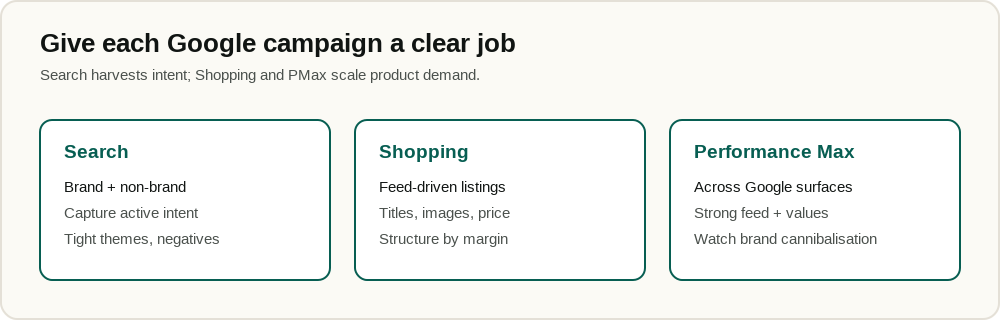
There is no universally correct combination of Search, Shopping, and Performance Max. Consider what each campaign type contributes and what the business needs to control.
This table describes broad roles, not fixed requirements. Campaign features, inventory, and reporting options change. Use current Google Ads documentation to confirm which controls are available for your account and campaign type.
| Campaign type | Potential role | Important considerations |
|---|---|---|
| Search | Capture relevant queries with text ads and specific messaging | Query intent, keyword coverage, search terms, landing page relevance |
| Shopping | Show product information and imagery through eligible shopping inventory | Merchant Center eligibility, feed quality, price, availability, product data |
| Performance Max | Use Google’s automated campaign type across eligible Google inventory to pursue the selected objective | Conversion data quality, asset coverage, product feed, reporting limits, overlap and incrementality |
| Brand Search | Manage visibility for searches containing the brand name, when a separate strategy is justified | Existing organic demand, competition, reporting, incrementality |
| Remarketing or audience-supported activity | Re-engage eligible users where the campaign type and privacy requirements allow | Audience eligibility, consent, overlap, incremental value |
Design around business decisions
A campaign type should earn its place by solving a real need. For example, a Search campaign may be useful for query-specific messaging or tighter management of particular terms. Performance Max may be useful when the business can provide reliable conversion data and suitable assets and wants to use its automated reach. Shopping visibility depends on accurate product data and eligibility.
Avoid launching every campaign type merely because it exists. Start with a clear goal and build a structure that can be maintained and evaluated.
4. Search campaigns: intent and control
Search campaigns can help an ecommerce business reach users whose queries express product or category intent. Their value depends on the relevance of the query, ad, landing page, and commercial offer.
Build a search intent map
Group search terms by intent rather than collecting keywords without a plan. Useful categories may include:
The exact structure depends on search volume, product range, budget, and the control needed. Do not assume every keyword needs its own ad group or campaign.
- Brand terms: searches containing the brand or product line name.
- Category terms: broader searches for a product type.
- Specific product terms: searches for a product model, material, feature, or attribute.
- Problem or use-case terms: searches that describe a need the product may address.
- Comparison terms: searches comparing products or options, where the business can provide relevant information.
Match ad copy to the query
Ad copy should make the product, key differentiator, price or offer where appropriate, and next step clear. Avoid claims that cannot be substantiated. Ensure that the landing page fulfils the promise made in the ad.
Review search terms and exclusions
Regularly inspect available search-term reporting and identify irrelevant queries, mismatches, or terms that do not fit the business’s product and commercial strategy. Use negative keywords where appropriate, while checking that exclusions do not block relevant demand. Available reporting and controls depend on campaign type.
Use the right landing page
Send a category query to a relevant category page and a specific product query to the relevant product page when that is the best experience. Avoid sending every click to the homepage if it forces users to repeat the search they have already completed.
5. Shopping and Merchant Center
Shopping ads depend heavily on product data. The feed helps Google understand what a product is, when it is available, and how it relates to a shopper’s query or context.
Start with Merchant Center health
Review:
The exact requirements depend on product category, market, and programme eligibility. Consult current Merchant Center policies and diagnostics rather than relying on an old checklist.
- Account and website verification requirements
- Product approval and disapproval status
- Policy or data-quality issues
- Price and availability consistency between the feed and landing page
- Shipping and return information where required
- Product identifiers and category attributes where applicable
- Feed refreshes and diagnostics
- Landing-page accessibility and checkout quality
Improve product titles and attributes
Product titles should describe the actual product clearly and include relevant attributes where useful, such as brand, product type, material, size, colour, model, or compatibility. Attribute order should reflect how customers identify products in the category.
Do not stuff titles with repetitive keywords or add attributes that are not accurate. Product descriptions and structured data should match the actual product and landing page.
Make images accurate and useful
Use clear product imagery that represents the item being sold. Avoid misleading overlays, watermarks where disallowed, promotional text in primary images where restricted, or images that materially misrepresent colour, scale, or included accessories. Follow current image and product-data policies for the relevant market and category.
Manage product availability and price
Out-of-stock products, incorrect prices, broken landing pages, and mismatched shipping details can undermine campaign performance and account eligibility. Ensure feed updates reflect the store’s current catalogue and that users see consistent information after clicking.
6. Performance Max for ecommerce
Performance Max is an automated Google Ads campaign type that can use multiple Google advertising channels and inventory to pursue a selected objective. For ecommerce, product feeds and creative assets can be important inputs, but campaign results still depend on business goals, data quality, and the way success is evaluated.
When it may fit
Performance Max may be worth considering when:
These are planning considerations, not a guarantee of performance.
- The business has a clear conversion objective.
- Conversion tracking and values are reliable.
- Product data and Merchant Center status are healthy.
- Suitable creative assets and landing pages are available.
- The business can assess results against business economics.
- The account team understands the campaign’s reporting and control limitations.
Give the system accurate inputs
Review conversion actions, values, audience signals or other available inputs, asset coverage, final URL behaviour, product eligibility, and brand or placement controls where available. The exact options vary and can change; check the current campaign interface and documentation.
Do not add audience signals or creative assets merely to fill every field. Inputs should be relevant, accurate, and consistent with the objective.
Interpret results carefully
Performance Max reporting may not provide the same level of control or detail as every other campaign type. Use the available reporting, conversion diagnostics, product data, and business outcomes to assess performance. Avoid making strong claims about incremental growth based only on platform-attributed conversions.
Avoid automatic overlap assumptions
Campaigns can have overlapping eligibility or compete for attention in complex ways, but the practical impact depends on Google’s serving rules, campaign configuration, query, and available inventory. Do not assume that every overlap is harmful or that a specific campaign always takes priority in every situation. Review current documentation and the actual account evidence.
7. Product feed quality as a growth lever
Feed optimisation is not a one-time technical task. Product data should stay accurate as catalogue, price, stock, and merchandising change.
Product feed audit
For priority products, review:
- Product title and description
- Brand and identifiers where applicable
- Google product category and product type
- Image quality and accuracy
- Price and sale price consistency
- Availability
- Shipping and returns information
- Landing-page URL and mobile experience
- Variant relationships, sizes, colours, and other relevant attributes
- Disapprovals, warnings, and feed update timing
Prioritise products commercially
A feed can be technically eligible yet still contain products that are poor advertising candidates. Consider margin, stock depth, conversion history, return rate, price competitiveness, and strategic importance. Use the business’s actual data to set priorities.
Do not exclude products based on one brief fluctuation without understanding whether the issue is data quality, demand, seasonality, stock, or economics.
8. Conversion tracking and measurement
Campaign automation is only as useful as the signals and values it receives. Tracking errors can make a campaign appear better or worse than it is and can influence bidding decisions.
Tracking checklist
The exact setup depends on the website platform and measurement architecture. Follow current Google tag, Google Ads, GA4, and consent documentation as appropriate.
- Confirm that the primary conversion action matches the business goal.
- Verify purchase events across the full checkout journey.
- Check conversion value and currency.
- Prevent duplicate counting where relevant.
- Review tag implementation and diagnostics.
- Check consent and privacy settings for the markets served.
- Document attribution settings and conversion windows.
- Reconcile platform reporting with store orders and revenue.
- Account for refunds, cancellations, returns, and failed deliveries where relevant.
- Test changes to checkout, payment methods, and website code.
Define conversion actions carefully
A purchase should generally represent a meaningful completed transaction, not merely an add-to-cart or checkout start. Intermediate actions can be useful for diagnosis, but do not treat them as equivalent to revenue.
If lead or micro-conversions are included in bidding or reporting, clearly separate them from purchases so that stakeholders understand what the campaign actually optimises.
Compare platform and business reporting
Differences can occur because of attribution windows, conversion lag, time zones, consent, cross-device behaviour, refunds, cancellations, and differing definitions of revenue. Document these differences and use a consistent reporting approach instead of expecting every system to show identical figures.
9. Budget allocation and scaling
Budget allocation should reflect opportunity, evidence, risk, and fulfilment capacity. A campaign that can spend more is not necessarily one that should receive more budget.
Set the decision rules
Before scaling, define:
- The target outcome and acceptable acquisition cost
- The margin and break-even conditions
- The time period used to evaluate results
- The amount of volatility the business can tolerate
- The stock and delivery capacity available
- How new-customer acquisition will be assessed
- The conditions for increasing, holding, or reducing spend
Use staged decisions
A disciplined process can be:
There is no universal budget increase percentage or ROAS threshold that fits every account. The appropriate approach depends on campaign volatility, volume, margins, seasonality, and the business’s risk tolerance.
- 01Confirm tracking and conversion values.
- 02Confirm that the campaign is reaching relevant demand.
- 03Review purchase cost and value alongside margin and order quality.
- 04Check whether the campaign has sufficient evidence for the decision.
- 05Increase or reallocate budget in a controlled way.
- 06Review the result over an appropriate period, accounting for conversion lag.
- 07Document the outcome and the next decision.
Avoid scaling into operational problems
More demand can create problems if products are out of stock, delivery promises cannot be met, customer service is under-resourced, or fulfilment costs rise. Coordinate advertising plans with merchandising, inventory, operations, and finance.
10. Landing pages and conversion rate
Google Ads brings users to the website; the website must help them decide. Poor landing-page experience can waste spend regardless of how well the account is structured.
Review:
Use analytics and customer feedback to identify friction. Do not assume every conversion-rate issue can be solved by changing bids or campaign type.
- Relevance between query, ad, and landing page
- Mobile speed and usability
- Product images, descriptions, dimensions, and specifications
- Price, discounts, shipping, returns, and delivery estimates
- Availability and variant selection
- Reviews and trust information, where genuine and appropriately used
- Checkout friction and payment options
- Error states and broken links
- Analytics and purchase-event accuracy
11. Common Google Ads mistakes in ecommerce
Mistake 1: using ROAS as the only success metric
ROAS ignores many costs and may not show whether new customers were acquired. Use actual margin and order-quality data.
Mistake 2: neglecting Merchant Center diagnostics
Disapproved or inaccurate product data can reduce eligibility and waste time. Make feed health part of routine operations.
Mistake 3: launching automation before fixing measurement
Automated campaigns need reliable conversion signals. Verify the events and values before interpreting results.
Mistake 4: splitting campaigns without a business reason
Too many small campaigns can fragment budget and increase management overhead. Separate activity only when it provides meaningful control or insight.
Mistake 5: combining products with very different economics
A single blended target may hide low-margin or high-return products. Use product-level analysis and suitable controls where justified.
Mistake 6: ignoring search intent
Broad reach is not automatically useful reach. Check query relevance, product match, and the landing-page experience.
Mistake 7: sending all traffic to the homepage
Users should be able to find the product or category promised by the ad without unnecessary navigation.
Mistake 8: making frequent changes without a decision log
Repeated changes make cause and effect harder to understand. Document what changed, why, and when the outcome will be reviewed.
Mistake 9: judging results before conversion lag has passed
Recent clicks may convert later. Use a consistent review window appropriate to the business and campaign.
Mistake 10: overlooking fulfilment and returns
A sale that is cancelled, returned, or expensive to fulfil may not create the expected business value. Include order quality in the evaluation.
12. A practical Google Ads audit checklist
Business and economics
- Confirm objectives, target markets, priority products, and commercial constraints.
- Document product margin, variable costs, break-even conditions, and acquisition targets.
- Review stock, pricing, shipping, returns, and fulfilment capacity.
Account structure
- Map campaigns to business objectives and product groups.
- Identify unnecessary duplication or fragmentation.
- Check budget allocation and ownership.
- Review brand and non-brand reporting where relevant.
- Confirm that each campaign has a clear purpose.
Search
- Review query intent and keyword coverage.
- Inspect available search-term reporting.
- Check negative keywords and exclusions.
- Assess ad relevance and landing-page match.
- Confirm that copy and offers are accurate.
Shopping and Merchant Center
- Review product approval status and diagnostics.
- Check price, availability, identifiers, titles, attributes, and images.
- Verify landing-page URLs and shipping information.
- Prioritise products based on actual business value.
Performance Max
- Confirm objective and conversion actions.
- Review product eligibility and asset coverage.
- Check available reporting and controls.
- Assess outcomes against business data, not only platform-attributed ROAS.
Measurement
- Test purchase events, values, currency, and duplicate counting.
- Document attribution settings and conversion lag.
- Reconcile platform data with valid orders.
- Review privacy, consent, and data-use requirements.
Website
- Test mobile experience and page speed.
- Check product information, pricing, stock, shipping, and returns.
- Review checkout and payment options.
- Verify that the ad promise matches the landing page.
13. A 90-day implementation roadmap
Days 1-30: establish the foundation
Deliverable: a prioritised account and measurement plan.
- Audit the business economics and priority products.
- Validate conversion tracking and reporting definitions.
- Resolve Merchant Center disapprovals and data inconsistencies.
- Map campaigns to objectives and identify unnecessary complexity.
- Review Search query intent, landing pages, and exclusions.
- Establish a repeatable reporting and decision log.
Days 31-60: improve relevance and structure
Deliverable: an improved campaign and product-data setup with documented tests.
- Improve product titles, attributes, images, and landing pages.
- Refine Search coverage around relevant customer intent.
- Review campaign mix based on the account’s goals and data quality.
- Test creative assets and messaging where applicable.
- Align product prioritisation with margin, stock, and fulfilment.
- Evaluate results using a consistent time window and definitions.
Days 61-90: evaluate and scale responsibly
Deliverable: a documented growth plan for the next quarter.
This roadmap is a planning framework, not a guarantee of performance. Adjust the sequence and timing to the size and complexity of the account.
- Review performance against acquisition targets and business economics.
- Identify campaigns or product groups with credible room to grow.
- Increase investment only where evidence and operational capacity support it.
- Investigate weak results across tracking, query relevance, feed, website, and offer.
- Build the next testing roadmap and refresh priorities.
- Report both platform performance and business outcomes.
Final takeaway
Effective Google Ads for ecommerce starts with accurate product data, reliable conversion measurement, clear customer intent, and realistic business economics. Campaign types and automation can support the strategy, but they cannot replace it.
Build around the decisions the business needs to make. Keep the account as simple as possible while preserving necessary control. Improve the product feed and landing page, measure valid business outcomes, and scale only when the evidence and operational capacity support the next step.
FAQ
Frequently asked questions
There is no single best type for every store. Search, Shopping, and Performance Max can play different roles depending on the product catalogue, demand, conversion data, campaign controls, and business goals. Select campaign types based on a clear objective and measure results against business economics.
It can be useful for eligible ecommerce businesses, particularly when conversion tracking, product data, and creative assets are reliable. It is not a guaranteed shortcut to profitable growth. Review the current controls and reporting, and assess results using business data as well as platform reporting.
Shopping advertising relies on product data and Merchant Center eligibility. Confirm the current requirements for the specific campaign type, market, and product category in Google’s official documentation.
There is no universal target. The acceptable ROAS depends on margins, discounts, fulfilment costs, payment fees, returns, cancellations, and other variable costs. Calculate the business’s break-even conditions before setting a target.
Separate them when doing so improves budget control, reporting, or decision-making. Evaluate brand demand and incrementality carefully; brand clicks may capture existing demand rather than create entirely new demand.
Use a consistent review cadence based on conversion volume, campaign complexity, and conversion lag. Investigate technical or policy issues promptly, but avoid frequent changes that make performance difficult to interpret.
Differences can arise from attribution, conversion lag, time zones, consent, refunds, cancellations, cross-device behaviour, and different definitions of revenue. Document the definitions and reconcile results using a consistent reporting method.
Possibly, depending on average order value, margins, acquisition cost, and the value of each conversion. A conversion rate by itself cannot determine profitability. Evaluate the complete economics and improve the parts of the journey that create friction.
Similar posts
Performance Marketing
Performance Marketing for Ecommerce: What Actually Drives Profitable Growth
A profit-first guide to ecommerce performance marketing: how to connect paid media, SEO, conversion optimisation and measurement into one system that grows revenue without sacrificing margin.
11 min read
Google Ads
Google Performance Max for Ecommerce: Setup, Optimisation, and Measurement
Learn how to set up, optimise, and measure Google Performance Max for ecommerce, from Merchant Center feeds and conversion tracking to ROAS, profitability, and testing.
17 min read
Google Ads
Google Shopping Ads Optimisation: Product Feeds, Structure, and Profitability
Improve Google Shopping performance with a practical guide to product feed quality, Merchant Center diagnostics, product segmentation, conversion tracking, and profitability.
14 min read
Related services
Related work