Google Ads
Google Performance Max for Ecommerce: Setup, Optimisation, and Measurement

> Editorial status: Draft for review. Verify platform details against current official documentation before publication. FAQ questions are editorially drafted and have not been checked against live People Also Ask results.
Quick answer
No campaign type is right for every situation. Suitability depends on measurement quality, product data, business goals, available budget, and the need for control or reporting. Test against a clear objective rather than adopting it solely because it is automated.
Key takeaways
- Google Performance Max (PMax) can help an ecommerce business reach customers across Google’s advertising inventory from a single campaign.
- Performance Max is a goal-based Google Ads campaign type that can serve ads across eligible Google inventory using automation for bidding, placements, and combinations of assets.
- Start with unit economics rather than a benchmark copied from another account.
- For retail PMax, product data quality can strongly affect which products are eligible and how clearly they match shopper intent.
Table of contents
- Introduction
- 1. Understand what Performance Max does
- 2. Check the economics before choosing a target
- 3. Prepare Merchant Center and the product feed
- 4. Set up conversion measurement first
- 5. Build a campaign structure that matches the business
- 6. Organise product groups and asset groups thoughtfully
- 7. Use audience signals and search themes as inputs, not guarantees
- 8. Choose bidding and budget deliberately
- 9. Protect brand measurement and assess incrementality
- 10. Read reports and diagnose performance
- 11. Improve the landing page and the post-click journey
- 12. A practical 30-day operating plan
- 13. Common mistakes to avoid
- Frequently asked questions
- Recommended original visual assets
- Suggested internal links
- SEO and publishing checklist
- Official references
- Conclusion
Introduction
Google Performance Max (PMax) can help an ecommerce business reach customers across Google’s advertising inventory from a single campaign. But campaign automation does not remove the need for a sound product feed, accurate conversion measurement, sensible economics, useful creative assets, and disciplined analysis.
The common mistake is to treat PMax as a switch: connect Merchant Center, set a budget, select a target return on ad spend (ROAS), and wait for growth. A better approach is to give the system reliable inputs, define the business outcome clearly, and evaluate results against contribution margin and the wider marketing mix.
This guide explains how to plan, launch, measure, and improve Performance Max for ecommerce. It is written for practitioners who need an operating framework rather than a list of settings. Interface options and campaign capabilities can change, so confirm current controls in the Google Ads account and official documentation before implementation.
1. Understand what Performance Max does
Performance Max is a goal-based Google Ads campaign type that can serve ads across eligible Google inventory using automation for bidding, placements, and combinations of assets. For retail advertisers, product data from Google Merchant Center can be a central input. Depending on the campaign and account, ads may appear across Search, Shopping, YouTube, Display, Discover, Gmail, Maps, and other eligible inventory.
The appeal is reach and automation. The trade-off is that campaign-level controls and reporting differ from a manually structured set of channel-specific campaigns. PMax should therefore be assessed on the job it is meant to do, not assumed to replace every Search or Shopping campaign in every account.
Before launch, answer four questions:
PMax is not a substitute for strategy. It executes within the goals, data, budget, and creative inputs supplied to it.
- What business outcome should the campaign optimise for: purchase value, purchases, or another valid conversion?
- Which products, margins, stock levels, and geographies are eligible?
- What measurement signals can be trusted?
- How will the team determine whether incremental growth is profitable?
2. Check the economics before choosing a target
Start with unit economics rather than a benchmark copied from another account. A target ROAS that works for one store may be unprofitable for another because product margin, discounts, fulfilment, payment fees, returns, and repeat purchase behaviour differ.
A simplified calculation:
This is an illustrative calculation, not a recommended benchmark. Real calculations should use consistent revenue definitions and include relevant variable costs. If the business needs a contribution surplus after advertising, the target must be higher than break-even.
Useful checks:
Treat target ROAS as a bidding input, not proof of profitability. Compare platform-reported results with reconciled business data.
- Revenue from an order: PKR 10,000
- Product cost and other variable costs before advertising: PKR 6,500
- Contribution available before advertising: PKR 3,500
- Break-even advertising cost per order: PKR 3,500
- Break-even ROAS: PKR 10,000 ÷ PKR 3,500 = 2.86x
- Define whether reported revenue includes tax, shipping, discounts, and refunds.
- Use order-level margin or product-level margin where possible.
- Separate new-customer acquisition goals from blended revenue goals when the business has that requirement.
- Consider returns, cancellations, and cash-on-delivery confirmation rates where relevant.
- Avoid setting a target ROAS so restrictive that delivery becomes too limited, or so loose that the campaign spends into low-quality demand.
3. Prepare Merchant Center and the product feed
For retail PMax, product data quality can strongly affect which products are eligible and how clearly they match shopper intent. A campaign cannot compensate for inaccurate titles, missing identifiers, wrong availability, poor images, or a landing page that contradicts the feed.
Review these areas before launch:
Product titles. Put the most useful identifying information early: brand, product type, key attribute, model, size, material, or colour as appropriate. Write for how customers recognise the product, not by stuffing every keyword into the title.
Descriptions and attributes. Complete relevant product attributes accurately. Make descriptions informative and consistent with the destination page. Use category-specific attributes where they matter, such as dimensions, material, compatibility, or fit.
Images. Use clear, representative product images that comply with Merchant Center requirements. Check image quality, cropping, background, variant accuracy, and consistency across the catalogue. Do not use an image that implies a product includes accessories that are not supplied.
Price and availability. Ensure feed values match the landing page and checkout. Investigate mismatches promptly; they can cause disapprovals or a poor customer experience.
Identifiers and variants. Supply valid GTINs, brand, and MPN where applicable. Keep variants distinct and correctly associated. Do not fabricate identifiers for products that do not have them.
Landing pages. Send shoppers to the exact product or variant when possible. Pages should load reliably, work on mobile, and make price, delivery, returns, and purchase options clear.
Diagnostics. Review Merchant Center item issues, account issues, policy notices, and product approval status. Prioritise errors that affect high-value or strategically important products.
Create a feed QA process before adding budget. For large catalogues, segment by category, margin, availability, and strategic importance rather than treating every SKU as equally valuable.
4. Set up conversion measurement first
Automation is only as useful as the signals it receives. Before launch, test the full purchase journey and confirm that Google Ads receives the intended conversion actions and values.
A practical measurement checklist:
Avoid optimising the campaign toward every available event. Page views, add-to-cart actions, and purchases are not interchangeable business outcomes. If purchase volume is limited, diagnose the cause and use interim signals thoughtfully; do not accidentally teach the campaign that low-value events are the end goal.
For businesses with cancellations, returns, or COD orders, platform conversion values may need to be reconciled with later business outcomes. Use appropriate supported measurement approaches and clearly document what the reported value represents.
- 01Confirm the primary purchase conversion is configured correctly.
- 02Check that transaction IDs are passed where supported to help prevent duplicate counting.
- 03Verify that conversion value reflects the chosen revenue definition.
- 04Test consent and tag behaviour against the business’s applicable privacy requirements.
- 05Review Google tag and/or Google Tag Manager implementation.
- 06Confirm that enhanced conversions are implemented correctly if used and eligible.
- 07Check attribution settings and the conversion windows used for reporting.
- 08Test checkout, payment success, order confirmation, and cross-domain behaviour where relevant.
- 09Compare test transactions with analytics and order-management records.
- 10Document which actions are primary for bidding and which are secondary for observation.
5. Build a campaign structure that matches the business
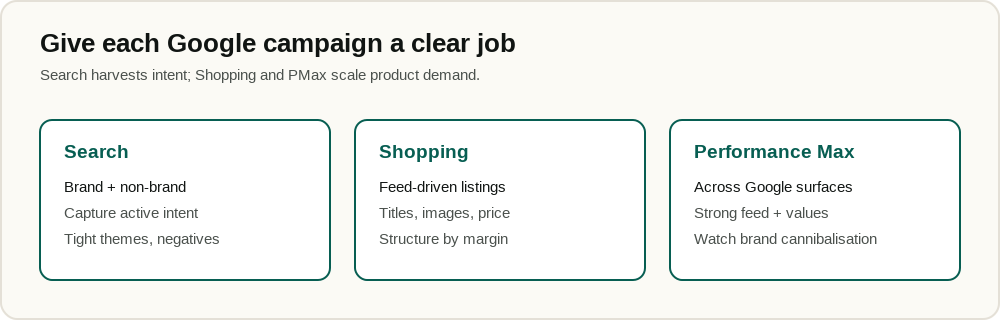
A campaign structure should reflect meaningful business differences, not a desire to create as many campaigns as possible. Over-fragmentation can divide budget and conversion data, while an overly broad campaign can obscure different margins, priorities, or operational constraints.
Potential reasons to separate campaigns include:
Potential reasons to consolidate include:
There is no universal campaign count. Begin with the simplest structure that supports budget allocation, measurement, and meaningful decisions. Expand only when the separation enables a clear action.
- Different countries, languages, or business objectives.
- Material differences in margin or acceptable return.
- Product groups with distinct budgets or promotional priorities.
- Different conversion goals or customer-acquisition strategies.
- Brand and non-brand measurement needs that require separate analysis.
- Inventory or fulfilment constraints that affect what should be promoted.
- Similar products with the same objective and economics.
- Low conversion volume that would be split across multiple campaigns.
- Duplicate structures that create unnecessary management overhead.
- Product segments that do not have a clear operational or strategic difference.
6. Organise product groups and asset groups thoughtfully
Product groups and asset groups serve different purposes. Product groups help determine which Merchant Center products are included; asset groups organise creative assets and related signals within a campaign. Exact controls and terminology can change, so check the current Google Ads interface.
Product selection. Decide which products should be eligible. Exclude out-of-stock, low-margin, discontinued, or operationally unsuitable items when appropriate. Make sure exclusions and feed rules are maintained as the catalogue changes.
Asset group logic. Group assets around a coherent theme such as a product category, use case, audience need, or promotion. A group should have a clear reason to exist. Avoid mixing unrelated products and messages simply to fill a campaign.
Creative assets. Provide relevant headlines, descriptions, images, logos, and video assets as applicable. Show the product clearly, communicate a credible reason to choose it, and keep claims consistent with the landing page. Use real product imagery and brand assets rather than generic filler.
Video. Where video assets are relevant, create purposeful versions for the placements and formats you intend to support. Review how assets render and whether the message remains understandable without sound. Do not assume an automatically generated or repurposed asset will communicate the brand as effectively as a deliberately produced one.
Landing-page alignment. Ensure the assets and destination work together. A promotion in the ad should be visible and valid on the landing page. A category-level message should not lead to a page where the featured products are hard to find.
Asset groups are not a reason to multiply near-identical campaigns. Keep each group meaningful, review asset performance where reporting is available, and refresh creative when customer response or product priorities change.
7. Use audience signals and search themes as inputs, not guarantees
PMax offers inputs that can help inform automation, including audience signals and, where available, search themes. These should be used to communicate useful context, not treated as hard targeting restrictions unless the relevant setting explicitly functions that way.
Audience signals may include relevant first-party lists, customer segments, or carefully selected audience ideas. Use only data that the business is permitted to use and that meets applicable consent and platform requirements. Keep customer lists current and avoid assuming that every audience signal will be used in the same way as a traditional audience-targeted campaign.
Search themes can communicate relevant queries or topics that matter to the business. Prioritise terms that describe products, categories, use cases, and purchase intent. Do not add a long list of loosely related phrases in the hope that quantity alone improves performance.
Use these inputs to express a clear business hypothesis:
Review the available search-term insights and other reporting in the account, while recognising that visibility and granularity may be limited. Keep dedicated Search campaigns where specific query control, coverage, or reporting is important.
- Which customer need is relevant?
- Which products solve that need?
- What query or category context describes the intent?
- What evidence will tell us whether the campaign is attracting the right demand?
8. Choose bidding and budget deliberately
Bidding strategy should match the campaign’s conversion data and business goal. For ecommerce, conversion value bidding and target ROAS may be appropriate when purchase values are reliable and the account has sufficient usable data. Other situations may call for a different approach. Confirm the current eligibility requirements and recommendations in Google Ads.
Before selecting a target:
Avoid changing budget, target ROAS, product selection, landing pages, and conversion settings simultaneously. When many variables change together, it becomes difficult to identify the cause of a result.
Make changes based on evidence, not impatience. Allow enough time to evaluate the effect in light of conversion delay and volume. If the campaign is under-spending, investigate restrictive targets, eligibility, product approvals, budget, and demand before simply loosening every control. If spend rises while profitability declines, examine product mix, conversion quality, and incrementality, not only the bidding setting.
- Review recent conversion volume and value stability.
- Check whether conversion tracking recently changed.
- Account for promotions, seasonality, stock, and major site changes.
- Establish a budget that can support the intended learning and business objective.
- Decide how much short-term volatility the business can reasonably tolerate.
9. Protect brand measurement and assess incrementality
PMax may capture existing demand as well as help create or influence demand. Platform-reported conversions alone may not tell you how much growth was incremental, especially when branded queries, returning customers, promotions, and other campaigns contribute to the same sales.
A measurement plan should distinguish:
Use available brand-related controls and reporting where appropriate, and evaluate their current behaviour in Google’s documentation. Do not assume every account has identical options or that any one setting creates a perfect incrementality test.
For a more reliable view, compare trends with business-wide sales, other channels, and historical patterns. Where feasible, use a controlled experiment or a defensible test design. Document limitations and avoid claiming causal lift from a simple before-and-after comparison when other factors changed at the same time.
- Total business outcomes from platform-attributed outcomes.
- New-customer acquisition from returning-customer revenue, when relevant.
- Brand demand from non-brand demand where the available controls and reporting allow meaningful analysis.
- Revenue growth from contribution growth.
- Campaign changes from wider changes in price, stock, promotions, or seasonality.
10. Read reports and diagnose performance
A useful review does not stop at campaign ROAS. Read the campaign alongside product, conversion, and business data.
If spend is low: check campaign eligibility, product approvals, budget, bidding target, conversion setup, feed quality, and whether there is sufficient relevant demand.
If spend is high but conversion value is weak: validate purchase tracking and values first. Then inspect product mix, landing-page relevance, checkout friction, price competitiveness, delivery terms, stock, and query intent where reporting permits.
If ROAS looks strong but profit is weak: calculate contribution after product cost, discounts, fulfilment, payment fees, returns, and advertising. A campaign can favour high-revenue products that contribute relatively little margin.
If performance changes suddenly: check site releases, feed updates, disapprovals, stock changes, promotion expiry, price changes, tracking releases, and competitor or seasonal factors before making broad campaign edits.
If results vary by product: segment analysis by category, margin, price band, and availability. Use those findings to decide whether to change product eligibility, feed content, landing pages, or campaign structure.
If a new campaign appears weak: verify setup and measurement before judging it. Consider conversion delay and the amount of evidence available. Do not promise that a fixed “learning period” guarantees a particular outcome.
11. Improve the landing page and the post-click journey
PMax optimisation is not limited to the Google Ads interface. Once a shopper clicks, the website has to fulfil the promise made in the ad.
Prioritise:
For Pakistan and other markets where cash on delivery is important, measure the order lifecycle beyond the initial order event when possible: confirmation, dispatch, delivery, cancellation, and return. Do not treat every placed order as equivalent to realised revenue.
Use analytics and customer feedback to identify friction. Change one important part of the journey at a time when possible, and evaluate conversion rate and contribution, not just click-through rate.
- Mobile speed and stable layout.
- Clear product imagery and variant selection.
- Price, discounts, availability, delivery, and returns information.
- Trust signals that are genuine and easy to verify.
- A straightforward add-to-cart and checkout flow.
- Relevant payment methods and accurate delivery estimates.
- Clear handling of out-of-stock or unavailable variants.
- Consistency between ad creative, feed, and landing page.
12. A practical 30-day operating plan
The schedule below is an example framework, not a guarantee that a campaign will become profitable within 30 days. Adjust it to the account’s volume, product catalogue, conversion delay, and release process.
Days 1-5: Audit
Days 6-10: Design
Days 11-15: Launch and validate
Days 16-23: Diagnose
Days 24-30: Make evidence-based adjustments
The most useful output of the first month is not necessarily a dramatic ROAS increase. It is a trustworthy measurement foundation, a clear understanding of the product mix, and a repeatable process for deciding what to improve next.
- Calculate break-even ROAS and target contribution.
- Audit Merchant Center account and item diagnostics.
- Review product titles, attributes, images, price, availability, and landing pages.
- Test purchase conversion tracking and values.
- Record current business and advertising baselines.
- Define the campaign’s job and eligible products.
- Decide which product, geography, or business differences justify separation.
- Prepare asset groups around meaningful themes.
- Create relevant creative assets and landing-page plans.
- Set bidding and budget in line with the evidence available.
- Confirm campaign delivery and product eligibility.
- Check conversion reporting against real transactions.
- Review spend, conversion delay, asset rendering, and early diagnostic signals.
- Avoid unnecessary structural edits while confirming the setup works.
- Compare platform results with order and margin data.
- Investigate product segments that drive spend or value.
- Review search insights and available placement or asset reporting.
- Fix feed, tracking, and landing-page problems before making aggressive bidding changes.
- Prioritise one or two high-impact improvements.
- Update product eligibility or feed content where the evidence supports it.
- Refresh weak or outdated creative assets.
- Change targets or budgets cautiously and document the rationale.
- Create a next-month plan based on profitability and confidence in the data.
13. Common mistakes to avoid
- Launching before purchase tracking and conversion values are validated.
- Treating a target ROAS as a profit guarantee.
- Sending the entire catalogue into a campaign without checking margins, stock, and eligibility.
- Using weak, repetitive, or irrelevant creative assets.
- Treating audience signals or search themes as guaranteed targeting controls.
- Making multiple major changes at once and then guessing which one worked.
- Evaluating the campaign only on Google Ads-reported ROAS.
- Ignoring refunds, cancellations, and fulfilment economics.
- Splitting campaigns without a clear reason or consolidating products with incompatible goals.
- Assuming that more automation removes the need for a strong feed and landing page.
- Making causal claims about incremental revenue without a suitable test.
Conclusion
Google Performance Max can be a useful part of an ecommerce growth system when the business provides accurate product data, trustworthy conversion signals, relevant creative, and a clear commercial objective. Automation can help allocate delivery, but it cannot fix inaccurate tracking, weak product economics, poor landing pages, or unclear priorities.
The operating principle is simple: diagnose the business first, acquire demand with reliable inputs, convert that demand through a strong customer experience, scale based on evidence, and compound learning over time. Judge PMax by its contribution to the business, not by the number of automated features it offers.
FAQ
Frequently asked questions
No campaign type is right for every situation. Suitability depends on measurement quality, product data, business goals, available budget, and the need for control or reporting. Test against a clear objective rather than adopting it solely because it is automated.
Not necessarily. It can serve across eligible inventory and use Merchant Center product data, but dedicated Search campaigns may still be valuable for specific query coverage, control, or reporting needs. Plan the account around business objectives and evaluate overlap carefully.
There is no universal ideal number. Create groups when there is a meaningful difference in product theme, audience need, creative message, or landing-page experience. Avoid creating groups just to increase the count.
Only if it fits the account’s conversion setup, data, and objective. Review current Google Ads guidance and avoid setting a target based on an unrelated account’s benchmark.
Potential causes include a restrictive target, limited eligible products, feed or policy issues, budget constraints, weak conversion setup, or limited demand. Diagnose these possibilities before making broad changes.
Possibly, but ROAS alone cannot confirm profit. Include product costs, discounts, fulfilment, payment fees, returns, and other relevant variable costs in the calculation.
Use a regular review cadence, but make changes when there is enough evidence and a clear hypothesis. Check diagnostics more frequently than you make major structural or bidding changes.
Similar posts
Google Ads
Google Ads for Ecommerce: A Practical Growth Guide for 2026
Learn how to structure Google Ads for ecommerce, combine Search, Shopping and Performance Max, measure profitability, improve product feeds, and scale responsibly.
19 min read
Google Ads
Google Shopping Ads Optimisation: Product Feeds, Structure, and Profitability
Improve Google Shopping performance with a practical guide to product feed quality, Merchant Center diagnostics, product segmentation, conversion tracking, and profitability.
14 min read
Measurement
Google Ads Conversion Tracking for Ecommerce: A Practical Measurement Framework
Build reliable Google Ads ecommerce measurement with a practical guide to purchase events, conversion values, duplicate prevention, GA4 reconciliation, enhanced conversions, and privacy-aware tracking.
14 min read
Related services
Related work