Google Ads
Google Shopping Ads Optimisation: Product Feeds, Structure, and Profitability

> Editorial note: Verify platform requirements against current official documentation before publishing. FAQs are editorial drafts and have not been checked against live People Also Ask results.
Quick answer
There is no single lever for every account. Accurate product data, reliable conversion measurement, relevant landing pages, competitive offers, and sound unit economics work together.
Key takeaways
- Google Shopping can put product images, prices, store information, and other product details in front of people who are actively researching what to buy.
- Shopping ads use information supplied through Merchant Center to show relevant product details to potential customers.
- Before changing a bid or target ROAS, identify which products can support advertising costs.
- Merchant Center diagnostics should be part of the routine account review.
Table of contents
- Introduction
- 1. How Google Shopping works
- 2. Start with margin and product economics
- 3. Audit Merchant Center before optimising campaigns
- 4. Optimise product titles and attributes
- 5. Improve images and product presentation
- 6. Keep price, availability, and landing pages aligned
- 7. Structure products around meaningful differences
- 8. Select campaign and bidding settings with a clear goal
- 9. Read product-level performance, not only account averages
- 10. Diagnose common Shopping performance problems
- 11. A repeatable weekly optimisation workflow
- 12. A practical 30-day improvement plan
- Frequently asked questions
- Recommended original visual assets
- Suggested internal links
- SEO and publishing checklist
- Official references
- Conclusion
Introduction
Google Shopping can put product images, prices, store information, and other product details in front of people who are actively researching what to buy. For ecommerce brands, performance depends on more than bids: product data, price competitiveness, availability, landing-page quality, conversion measurement, and product-level economics all shape the outcome.
Shopping ads are powered by product data from Google Merchant Center and campaign settings in Google Ads. The exact campaign options and reporting available can change, so use this article as an operating framework and confirm current controls in official documentation before implementation.
The objective is not simply to generate more clicks. It is to make the right products eligible, help shoppers understand the offer, and invest where the business can fulfil demand profitably.
1. How Google Shopping works
Shopping ads use information supplied through Merchant Center to show relevant product details to potential customers. Depending on the setup and current Google inventory, shoppers may see a product image, title, price, availability, store or shipping information, and other eligible details.
Unlike conventional text ads, the advertiser does not build every product ad as an individual keyword-and-copy combination. Product data and Google’s systems help determine relevance and delivery. That makes feed quality a core optimisation lever.
A useful mental model is:
If any layer is unreliable, campaign-level adjustments may not solve the underlying issue.
- Merchant Center manages product information and diagnostics.
- The product feed or connected data source supplies product attributes.
- Google Ads manages campaign objectives, budgets, bidding, and other settings.
- The ecommerce website confirms the offer and completes the transaction.
- Business reporting determines whether the resulting orders contribute profitably.
2. Start with margin and product economics
Before changing a bid or target ROAS, identify which products can support advertising costs. Revenue is not profit, and a high-value order may contribute less than a lower-value one if margins, shipping, discounting, or return rates differ.
For each product or useful product group, collect:
Illustrative example: a product sells for PKR 8,000. If product cost and other variable costs before advertising total PKR 5,200, the amount available before advertising is PKR 2,800. The simplified break-even ROAS is PKR 8,000 ÷ PKR 2,800 = 2.86x. This example excludes fixed overhead and assumes the inputs are measured consistently; it is not a universal target.
Use economics to inform product eligibility, budget allocation, and reporting. If margins vary materially, one blended ROAS target may hide important differences. Do not invent product-level margins if the business cannot provide them; mark unknowns and use a conservative decision process.
- Selling price and typical discount.
- Product cost and variable fulfilment costs.
- Payment fees and other order-level costs.
- Return, cancellation, and refund patterns where available.
- Stock availability and replenishment constraints.
- Strategic role, such as hero product, new launch, or clearance item.
3. Audit Merchant Center before optimising campaigns
Merchant Center diagnostics should be part of the routine account review. Resolve account-level issues and product disapprovals before trying to solve delivery problems with bidding changes.
Review:
Prioritise issues by business impact. A disapproval affecting a high-revenue category deserves attention before a minor warning on an unimportant product. After a fix, confirm that the item has been reprocessed and its status updated rather than assuming the change took effect immediately.
Keep a change log for feed rules, app integrations, supplemental feeds, and manual edits. If the catalogue is large, assign clear ownership for product data so marketing and ecommerce teams know who investigates recurring problems.
- Account status and any required business verification.
- Feed processing and scheduled data refreshes.
- Product approval and disapproval reasons.
- Price and availability mismatches between feed and landing page.
- Missing or invalid attributes.
- Image and destination issues.
- Shipping and returns information where required.
- Policy notifications and unresolved warnings.
4. Optimise product titles and attributes
Product titles are one of the most important places to communicate what an item is. A good title is clear, accurate, and specific. It reflects the product and includes attributes that help distinguish it from similar items.
A practical title pattern might be:
Brand + Product Type + Key Attribute + Model or Size + Variant, adjusted for the category and the information shoppers actually need.
Examples below are illustrative:
Do not use an example brand unless it is the real brand for the product. The point is the structure, not the wording itself.
Title guidance:
Complete other applicable attributes accurately, including brand, GTIN, MPN, product category, condition, colour, size, material, gender, age group, or other category-specific fields where relevant. Do not fabricate identifiers. For products without a valid identifier, follow Google’s current instructions for that product type.
- Weak: “Premium Classic”
- Clearer: “Northline Men’s Leather Biker Jacket, Black”
- Weak: “Comfort Set”
- Clearer: “Cotton Sateen Duvet Cover Set, King, White”
- Put the most distinguishing information early.
- Use natural product terminology.
- Include size, colour, material, compatibility, or model where relevant.
- Keep titles aligned with the landing page and variant.
- Avoid promotional text, repetitive keywords, unsupported claims, and irrelevant attributes.
- Follow current Merchant Center rules for title length and formatting.
5. Improve images and product presentation
A product image is often the first visual cue a shopper uses to judge relevance. Images should be high quality, accurately represent the item, and comply with current Merchant Center requirements.
Check:
For fashion, bedding, furniture, electronics, and other visually led categories, image quality can influence both click-through rate and the quality of traffic. However, do not assume that a higher click-through rate always means better commercial performance. Review conversion rate, average order value, returns, and contribution after advertising as well.
Use genuine product photography and approved lifestyle images. Do not imply that accessories or features are included when they are not.
- The main image shows the actual product clearly.
- The image matches the selected variant.
- Cropping and scale make the item easy to understand.
- Text, watermarks, borders, or promotional overlays do not violate current requirements.
- Additional images, where supported, answer useful questions about fit, detail, scale, or use.
- The image on the landing page is consistent with the feed.
6. Keep price, availability, and landing pages aligned
A shopper should not discover after clicking that the product is unavailable, the price is different, or the advertised variant cannot be selected. Feed and website consistency is both a technical requirement and a trust issue.
Check that:
For large catalogues, monitor price and availability mismatches automatically if the platform and data stack support it. Investigate recurring errors at the source, such as an integration mapping issue, rather than repeatedly correcting individual items.
- Price and currency match the destination.
- Availability is updated promptly.
- Sale prices and their effective dates are accurate.
- Product variants resolve to the correct page or selection.
- Shipping and delivery details are clear.
- The page works on mobile and loads reliably.
- The primary purchase action is easy to find.
- Returns, warranty, and payment information are accessible where relevant.
7. Structure products around meaningful differences
Product segmentation should make it easier to allocate budget and understand performance. It should not create unnecessary complexity.
Useful segmentation dimensions can include:
Use a separate campaign when there is a meaningful difference in budget control, business objective, geography, or measurement requirement. Use product groups, listing groups, labels, or other available controls where they provide the needed separation without creating excessive campaign fragmentation.
Labels can support operational groups such as “high margin,” “seasonal,” or “clearance” if they are accurate and maintained. Agree on the definition with finance and merchandising. A label called “high margin” is not useful if no one knows when it is assigned or how often it is refreshed.
Avoid splitting every product into its own campaign. Excessive fragmentation can make budget management harder and reduce the amount of useful data available to each segment.
- Product category or product type.
- Margin tier or contribution potential.
- Price band or average order value.
- Brand versus non-brand business priorities.
- Bestsellers, new launches, or seasonal products.
- Stock depth and replenishment risk.
- Geographic or fulfilment differences.
- Products that need different promotional treatment.
8. Select campaign and bidding settings with a clear goal
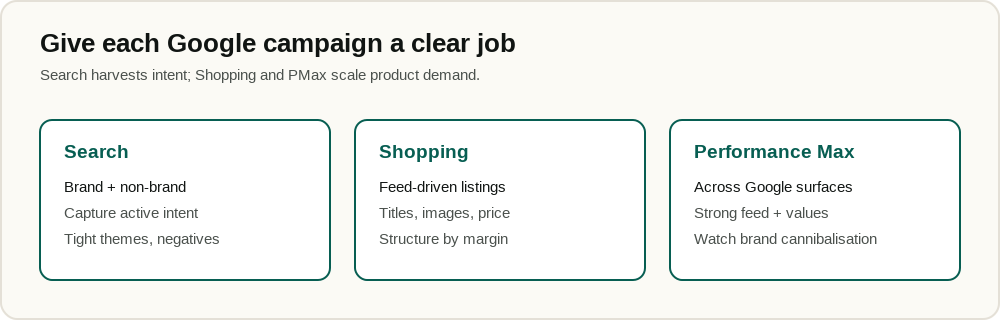
Shopping inventory can be accessed through different Google Ads campaign types, including Standard Shopping and Performance Max, subject to current product availability and account eligibility. They do not provide identical controls or reporting. Choose the setup based on the business objective, the need for control, measurement quality, and the account’s broader campaign architecture.
Before launch or a major change:
Automated bidding can be useful when the goal and conversion signals are well configured. But target ROAS is not a profit setting: it optimises toward a platform-reported value signal, not necessarily contribution after all costs.
Do not change budget, bid target, feed structure, and landing pages all at once unless a critical issue requires it. Change logs and a clear review window make results easier to interpret.
- 01Define the primary outcome: purchase value, purchases, or another valid business goal.
- 02Confirm that conversion tracking and values are reliable.
- 03Calculate break-even and desired profitability.
- 04Decide which products and locations are eligible.
- 05Set a realistic budget and an initial bidding approach.
- 06Document the hypothesis and success criteria.
- 07Check how the campaign may interact with other campaigns.
9. Read product-level performance, not only account averages
Blended performance can hide major differences between products. One group may drive efficient sales while another consumes spend without producing enough contribution.
Review available reporting alongside your own product and order data:
Ask practical questions:
Use these findings to decide whether to improve the product page, adjust eligibility, update feed content, change promotional strategy, or restructure campaigns. Avoid making product decisions from tiny samples without acknowledging uncertainty.
- Spend and conversion value.
- Orders and conversion rate.
- Average order value.
- Product-level or category-level ROAS where available.
- Margin or contribution after advertising.
- New versus returning customer outcomes, if measured reliably.
- Refunds, cancellations, and returns.
- Stock availability and lost sales due to inventory constraints.
- Which products spend consistently but rarely convert?
- Which high-ROAS products have low margins or frequent returns?
- Which products have strong conversion rates but insufficient impressions?
- Are discounts driving revenue that would have occurred anyway?
- Did a feed or price change coincide with the performance shift?
- Are results affected by seasonality or stock-outs?
10. Diagnose common Shopping performance problems
Low impressions: Check approval status, feed freshness, demand, product relevance, bids or targets, budget, and campaign eligibility.
Many clicks but few purchases: Validate conversion tracking first. Then inspect search intent where available, price competitiveness, product page relevance, shipping costs, mobile usability, and checkout friction.
Strong ROAS but weak profit: Calculate contribution after product cost, discounts, fulfilment, payment fees, returns, and advertising. Consider whether high-revenue products have low margins.
Sudden decline: Check stock, price, promotions, website changes, feed errors, disapprovals, tracking releases, and seasonal shifts before making sweeping campaign edits.
Spend concentrated on a few products: Determine whether those products are actually the best commercial choice. Review their margins, stock, and role in the catalogue. Use segmentation or eligibility changes only when there is a clear rationale.
Frequent feed mismatches: Find the source of the discrepancy, platform integration, inventory system, pricing rules, or update timing, and fix it upstream where possible.
High click-through rate but poor order quality: Investigate misleading imagery, unclear pricing, variant mismatches, delivery expectations, and the difference between placed orders and completed orders.
11. A repeatable weekly optimisation workflow
A useful weekly workflow is consistent enough to reveal trends but flexible enough to respond to urgent issues.
Step 1, Check account health. Review Merchant Center diagnostics, policy issues, product approvals, and feed refreshes.
Step 2, Validate measurement. Look for unexpected conversion gaps, duplicate transactions, value changes, or discrepancies with order data.
Step 3, Review commercial performance. Compare revenue and spend with contribution margin, stock, discounts, and returns where the data is available.
Step 4, Identify the largest actionable issue. Choose one or two priorities rather than generating a long list of minor optimisations.
Step 5, Make a controlled change. Record the reason, the affected products or campaigns, the expected result, and the metric that will be reviewed.
Step 6, Reassess with context. Account for conversion delay, sample size, promotions, seasonality, and other changes before drawing conclusions.
For a large store, automate routine feed and performance alerts where possible. Automation should surface issues for action; it should not create unreviewed bulk changes that can disrupt important products.
12. A practical 30-day improvement plan
This is an example work plan, not a promise of results within a fixed period.
Week 1: Establish the baseline
Week 2: Improve product data
Week 3: Improve segmentation and experience
Week 4: Evaluate and prioritise
The result should be a cleaner product-data foundation and better decision-making, not just a larger number of campaign changes.
- Audit Merchant Center account and item diagnostics.
- Validate purchase tracking and conversion values.
- Gather product price, margin, stock, return, and cancellation data where available.
- Identify the highest-impact feed and landing-page problems.
- Rewrite unclear titles using accurate category-specific attributes.
- Correct identifiers and variant mapping where needed.
- Review images, prices, availability, and landing-page destinations.
- Resolve high-impact disapprovals and mismatches.
- Group products around meaningful business differences.
- Check whether campaign separation is justified.
- Improve the most important product pages and mobile checkout issues.
- Review campaign bidding and budget against the economics.
- Compare platform reporting with business outcomes.
- Identify product groups that deserve more, less, or different investment.
- Document which changes appear promising and where evidence is still weak.
- Build the next month’s worklist based on expected impact and implementation effort.
Conclusion
Google Shopping optimisation works best as a joined-up process: reliable product data, clear offers, accurate measurement, thoughtful segmentation, and decisions grounded in product economics. Campaign settings matter, but they cannot compensate for inaccurate feeds or a poor customer experience.
Use the weekly workflow to identify the highest-impact problem, make a deliberate change, and evaluate the business result with the right context. The goal is not simply more traffic or higher reported ROAS; it is sustainable, measurable ecommerce growth.
FAQ
Frequently asked questions
There is no single lever for every account. Accurate product data, reliable conversion measurement, relevant landing pages, competitive offers, and sound unit economics work together.
Make titles specific, accurate, and readable. Include the attributes that distinguish the product, and follow the current Merchant Center specification for the category.
Usually not. Separate campaigns when a meaningful difference in goals, budget, geography, or measurement requires it. Use product grouping controls for simpler segmentation when appropriate.
No. ROAS compares advertising-attributed value with ad spend. It does not automatically include product cost, fulfilment, payment fees, returns, and other variable costs.
Reasons vary and should be read from the current account diagnostics. Common areas to inspect include data accuracy, price or availability mismatch, image requirements, identifiers, landing pages, and policy compliance.
It depends on the objective, account setup, required controls and reporting, conversion data, and current Google Ads capabilities. Review current documentation and test with a clearly defined measurement plan where possible.
Review account health and major business changes regularly. Make larger bidding or structure changes when there is a clear hypothesis and enough evidence to assess the impact.
Similar posts
Google Ads
Google Ads for Ecommerce: A Practical Growth Guide for 2026
Learn how to structure Google Ads for ecommerce, combine Search, Shopping and Performance Max, measure profitability, improve product feeds, and scale responsibly.
19 min read
Google Ads
Google Performance Max for Ecommerce: Setup, Optimisation, and Measurement
Learn how to set up, optimise, and measure Google Performance Max for ecommerce, from Merchant Center feeds and conversion tracking to ROAS, profitability, and testing.
17 min read
Measurement
Google Ads Conversion Tracking for Ecommerce: A Practical Measurement Framework
Build reliable Google Ads ecommerce measurement with a practical guide to purchase events, conversion values, duplicate prevention, GA4 reconciliation, enhanced conversions, and privacy-aware tracking.
14 min read
Related services
Related work