SEO
Ecommerce SEO Keyword Research: Map Search Demand to Categories, Products, and Buying Guides

Keyword research for ecommerce is not simply a process of collecting high-volume phrases. It is the work of understanding what shoppers are trying to accomplish, identifying the pages that can best satisfy those needs, and building a site structure that helps both people and search engines discover the right products. A useful keyword strategy connects search demand to the right destination: a category page for broad product discovery, a product page for a specific item, a buying guide for evaluation, or a support page for post-purchase questions. When several pages target the same intent without a clear distinction, they can compete with one another and create a confusing experience. This guide presents a practical, repeatable framework for ecommerce SEO keyword research. It focuses on intent, page mapping, prioritisation, and implementation, not on chasing search volume in isolation.
Quick answer
It is the process of identifying relevant search queries, understanding the intent behind them, and mapping them to useful ecommerce pages such as categories, products, and buying guides.
Key takeaways
- SEO title: Ecommerce SEO Keyword Research: A Practical Guide
- Before opening a keyword tool, document the business model and catalogue.
- Use a combination of first-party evidence and keyword discovery tools.
- Search intent is the likely goal behind a query.
SEO metadata
SEO title: Ecommerce SEO Keyword Research: A Practical Guide
Meta description: Learn how to research ecommerce keywords, understand search intent, map terms to category and product pages, prioritise opportunities, and build a useful content plan.
Suggested URL: /insights/ecommerce-seo-keyword-research/
Primary keyword: ecommerce SEO keyword research
Secondary keywords: ecommerce keyword research, product keyword research, category page keywords, search intent, ecommerce SEO strategy
Category: Ecommerce SEO
Author: Afshaan Ahmed Memon
1. Start with the business and catalogue
Before opening a keyword tool, document the business model and catalogue. Identify the main product families, price bands, key differentiators, geographic markets, stock constraints, and the questions customers ask before buying. These details help distinguish commercially meaningful searches from terms that attract visitors unlikely to buy.
Create a catalogue map with the following fields:
For example, a home-textile retailer may have product families for bedsheets, duvet covers, pillowcases, towels, and protectors. Each family can contain distinct materials, sizes, colours, and use cases. The keyword plan should reflect real catalogue structure rather than inventing pages for every possible phrase.
- Product family and subcategory
- Representative products and variants
- Target market and language
- Main purchase considerations
- Margin or strategic importance, where the business can share it
- Availability and inventory considerations
- Existing landing page, if one exists
2. Collect keyword ideas from multiple sources
Use a combination of first-party evidence and keyword discovery tools. No single source provides the full picture. For a free starting list of real long-tail searches grouped by intent, try the keyword idea generator.
Useful sources include:
Record the source and collection date for each dataset. Keyword tools provide estimates, not a guarantee of future traffic or revenue. Search Console reports only the search activity visible for the property and date range selected.
- Google Search Console: queries that already generate impressions, clicks, and visits to existing pages.
- Google Keyword Planner: keyword ideas and estimated search ranges for planning.
- Internal site search: the words shoppers use when looking for products or information on the site.
- Customer service and sales conversations: repeated questions about sizing, compatibility, delivery, materials, care, warranties, and returns.
- Product reviews: language customers use to describe benefits, problems, and use cases.
- Competitor search results: page types and topic coverage visible in public search results.
- Marketplace search suggestions: additional language shoppers may use, interpreted carefully and checked against the actual business.
- Paid-search search terms: relevant queries from campaigns, subject to access, privacy, and account context.
3. Understand search intent before assigning a page
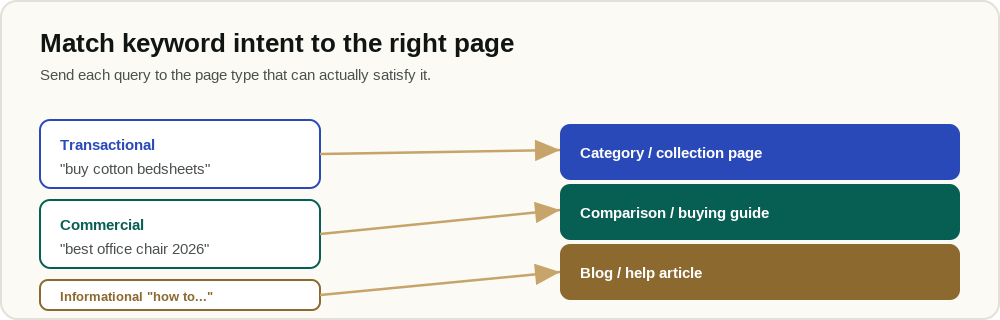
Search intent is the likely goal behind a query. Ecommerce research usually encounters several overlapping intent types.
Category or discovery intent: The searcher wants to browse a product class, such as “cotton bedsheets” or “ergonomic office chairs.” A relevant category or collection page may be the best destination.
Specific product intent: The searcher has a product, model, brand, or precise specification in mind. A product page, or a carefully selected product family page, may fit best.
Comparison and evaluation intent: The searcher is choosing between materials, features, products, or solutions. A comparison page or buying guide may help, provided it adds genuine value and does not duplicate category content.
Informational intent: The searcher wants to learn, solve a problem, or understand a product. A useful guide, care article, sizing explanation, or troubleshooting page may be appropriate.
Branded intent: The query includes a brand or product name. Decide whether the official brand page, category, product detail page, or support resource best satisfies the query.
Intent is not always obvious from wording alone. Review the live search results for the target market and device context. Note which page types appear consistently, but do not copy competitors blindly. Search results can vary by location, time, and query wording.
4. Build a clean keyword dataset
Create a working sheet with one row per keyword or query variant. Recommended columns include:
Standardise spelling, casing, plural forms, and close variants where appropriate, but do not collapse terms that express meaningfully different needs. A query for a particular size, material, compatibility requirement, or product model may deserve separate treatment if the catalogue and search results support it.
Keep the original query in a separate column when normalising variants. This preserves traceability and makes it easier to revisit grouping decisions.
- Keyword or query
- Source
- Country and language
- Search volume estimate and tool
- Search intent
- Product family
- Funnel or decision stage
- Current ranking URL, if known
- Proposed target URL
- Page type
- Business relevance
- Difficulty or competitive assessment
- Priority score
- Notes and next action
5. Group keywords by intent and page, not just by wording
Keyword clustering should answer a practical question: which queries can one useful page satisfy well? Similar wording is not sufficient evidence that two phrases belong on the same page.
A workable process is:
Do not create a separate landing page for every low-volume variation by default. Excessive near-duplicate pages can make navigation harder and provide little unique value. Conversely, do not force clearly different needs onto one page simply to reduce page count.
- 01Group obvious spelling and close-variant terms.
- 02Compare the likely intent behind each group.
- 03Review search results for the most important terms.
- 04Check whether the same page type and similar URLs rank for the queries.
- 05Assign one primary target and a set of relevant secondary terms to each page.
- 06Separate queries when they require materially different content or product selection.
6. Map keywords to ecommerce page types
The keyword map should connect each intent cluster to one preferred destination.
Homepage: Broad brand identity and the primary commercial proposition. It should not attempt to target every category keyword.
Category and collection pages: Broad product families and meaningful shopping refinements. Provide clear product selection, useful navigation, concise explanatory content where appropriate, and links to relevant subcategories.
Subcategory pages: More specific product groups that have enough catalogue depth and distinct shopper intent to justify a page.
Product detail pages: Exact product names, models, materials, features, sizes, and other attributes that genuinely distinguish an item. Keep product information accurate and consistent with the catalogue.
Buying guides and comparisons: Research-oriented queries that require explanation, selection criteria, comparisons, or advice. Link to relevant categories and products naturally.
Help and support pages: Delivery, returns, warranty, sizing, care, compatibility, and troubleshooting questions. These pages can support customer experience and reduce uncertainty, even when direct purchase intent is limited.
Record a single preferred URL for each important keyword cluster. If multiple existing pages target the same intent, decide whether to differentiate them, consolidate content, redirect a redundant URL, or leave them separate for a clear reason. Do not apply redirects without checking page value, backlinks, user journeys, and migration implications.
7. Research category and product keywords
Category research should begin with the actual taxonomy and the way customers describe product groups. Add meaningful attributes only when they change the shopping task or the available selection.
Product keyword research should use reliable product data: names, model identifiers, material, size, colour, compatibility, features, and other verified attributes. Do not add popular modifiers that the product does not satisfy. Misleading terms can attract irrelevant traffic and damage customer trust.
For variants, review how the ecommerce platform represents size and colour options. Variants may share one product URL, use distinct URLs, or follow another platform-specific structure. Keyword mapping must align with that real implementation and with the site's canonical and indexing strategy.
For branded products, distinguish searches for the brand itself from searches for products sold by that brand. Make sure the proposed page accurately represents the relationship and does not imply an unauthorised affiliation.
8. Build a useful keyword strategy for buying guides
Buying guides are most valuable when they answer a decision that product listings alone cannot answer. Look for recurring questions about differences, suitability, sizing, maintenance, compatibility, quality, and total cost.
A useful guide should:
Avoid producing dozens of thin articles that repeat the same generic advice. If two proposed articles answer essentially the same question, consider one stronger resource with clear sections. Use separate pages when the audience, intent, or required evidence genuinely differs.
- Define the reader's decision or problem.
- Explain selection criteria in plain language.
- Compare options fairly and identify trade-offs.
- Use verified product specifications and evidence.
- Link to relevant category and product pages.
- State limitations where products or advice vary by market.
- Be maintained when specifications, availability, or guidance change.
9. Prioritise opportunities with a transparent score
Search volume alone is an incomplete prioritisation method. A practical opportunity score can combine:
Use a simple low/medium/high rating or a weighted score if the team needs a more consistent queue. Document the scoring rules so the result is explainable. Do not present a score as a forecast of traffic, rankings, or revenue.
Give early attention to pages that are commercially important, already receive relevant impressions, have a clear intent match, and can be improved without major platform work. A high-volume phrase with weak relevance or an unrealistic competitive gap may be a lower priority than a more specific, achievable query group.
- Business relevance
- Intent fit
- Existing impressions or ranking opportunity
- Search demand estimate
- Ability to create a better page
- Commercial importance
- Implementation effort
- Data confidence
10. Use Search Console to refine the map
After publication or optimisation, use Google Search Console to review query and page performance over comparable periods. Look for:
A query appearing for a page does not automatically mean the page should be changed. Check the result context, the page's purpose, and the likely customer need. Low click-through rate can have several causes, including position, search-result layout, brand recognition, and snippet relevance. Do not diagnose it from one metric alone.
- Relevant queries generating impressions but few clicks.
- Pages receiving impressions for unexpected or mismatched terms.
- Multiple URLs appearing for the same query group.
- High-value pages with declining visibility.
- Queries whose wording suggests a missing category, product detail, or useful guide.
- New demand that the original keyword set did not capture.
11. Avoid common keyword research mistakes
Common mistakes include:
The solution is not a larger spreadsheet. It is a clear link between customer intent, catalogue reality, page purpose, and measurable outcomes.
- Choosing terms solely because they have high estimated volume.
- Treating every keyword variation as a separate page.
- Assigning the same primary intent to several competing URLs.
- Ignoring customer language and internal site search.
- Building pages for products or attributes that are not actually available.
- Copying competitor page structures without assessing customer needs.
- Publishing buying guides that add little beyond generic definitions.
- Using search volume as a promise of traffic or sales.
- Ignoring country, language, seasonality, and inventory.
- Failing to revisit the map after launch or catalogue changes.
12. A 30-day implementation plan
Week 1, Establish the baseline
Week 2, Research and cluster
Week 3, Map and prioritise
Week 4, Implement and measure
This is a planning sequence, not a guarantee that rankings will change within 30 days. Results depend on competition, site quality, crawl and indexing, implementation, demand, and other factors.
- Export relevant Search Console queries and pages.
- Document catalogue structure and priority product families.
- Gather internal search, customer questions, and available paid-search query data.
- Record current landing pages and major technical constraints.
- Expand the keyword set using appropriate tools.
- Classify intent and market/language.
- Review search results for priority clusters.
- Consolidate close variants and separate materially different intents.
- Assign primary and secondary keyword groups to preferred URLs.
- Identify page gaps, overlap, and potential cannibalisation.
- Score opportunities with documented criteria.
- Draft briefs for the highest-priority category, product, and guide pages.
- Update a manageable set of priority pages.
- Improve titles, headings, product information, internal links, and page content where needed.
- Validate indexability, canonicals, and relevant structured data.
- Record the changes and review performance over time.
13. How keyword research fits the Diagnose → Acquire → Convert → Scale → Compound framework
Diagnose: Establish how the current site appears in search, which pages satisfy which needs, and where gaps or overlap exist.
Acquire: Prioritise relevant queries and create or improve pages that attract the right audience, not just more sessions.
Convert: Make sure the landing page matches the search promise, provides accurate product information, and helps the visitor make a decision.
Scale: Extend successful patterns to related categories and product families without generating thin or repetitive pages.
Compound: Maintain the keyword map as the catalogue, customer language, competition, and search experience evolve. Use performance data to guide the next improvement cycle.
Keyword research is therefore an ongoing decision system, not a one-time export from a keyword tool.
Conclusion
Effective ecommerce keyword research connects real customer questions with real catalogue pages. Start with the business, collect evidence from multiple sources, classify intent, map queries to preferred URLs, and prioritise work transparently. Then use Search Console and commercial context to refine the plan.
The goal is not to rank for every possible phrase. It is to build a site that helps the right shopper find the right page, understand the offer, and make an informed decision, while giving the business a maintainable path to organic growth.
FAQ
Frequently asked questions
It is the process of identifying relevant search queries, understanding the intent behind them, and mapping them to useful ecommerce pages such as categories, products, and buying guides.
There is no fixed number. One page can satisfy several closely related queries when they share the same intent. The goal is to cover the topic naturally, not to reach a keyword count.
Not necessarily. The right approach depends on the platform, customer experience, inventory, search demand, and technical SEO implementation. Review canonical and indexation behaviour before creating or changing variant URLs.
Use a combination of Search Console, Keyword Planner, site-search data, customer questions, product information, and competitive search-result review. Tool estimates should be treated as directional.
Review it when launching categories, changing the catalogue, migrating platforms, or observing meaningful shifts in query and page performance. A scheduled quarterly review can help, with more frequent checks for important seasonal or rapidly changing areas.
No. Relevance, intent, competition, page fit, commercial context, and the ability to satisfy the query all matter. A smaller, well-matched query group may be more useful than a broad, poorly aligned term.
Similar posts
SEO
Ecommerce SEO Content Strategy: Build Useful Content That Supports Organic Growth
Build an ecommerce SEO content strategy with search-intent mapping, buying guides, category support, content quality checks, and measurement.
15 min read
SEO
Ecommerce Category Page SEO: How to Build Pages That Rank and Help Shoppers Choose
Learn how to optimise ecommerce category pages with better architecture, helpful copy, internal links, filters, and measurement.
15 min read
SEO
Ecommerce SEO: The Complete Guide to Growing Organic Revenue
Learn how to grow ecommerce organic revenue with category SEO, product pages, technical SEO, structured data, internal linking, content strategy and measurement.
24 min read
Related services
Related work