SEO
Ecommerce Category Page SEO: How to Build Pages That Rank and Help Shoppers Choose

Category pages sit between broad discovery and individual product decisions. They help shoppers narrow a catalogue, compare options, and move toward products that fit their needs. They also help search engines understand how a store organises its inventory and which product groups matter. Yet category pages are often treated as thin lists of product cards. Some have vague headings, little useful context, filters that generate uncontrolled URL variations, or no clear links to priority subcategories. Others contain long blocks of generic SEO copy that interrupt shopping without helping a customer decide. Effective ecommerce category page SEO brings together information architecture, search intent, useful category content, internal linking, crawl management, and user experience. The aim is not to add keywords everywhere. It is to create a page that makes the category understandable, navigable, and genuinely useful. My working framework is Diagnose → Acquire → Convert → Scale → Compound. For category pages, that means understanding how users and search engines currently reach the category, improving its relevance and discoverability, making product selection easier, measuring outcomes, and building a repeatable system across the catalogue.
Quick answer
It is the process of improving category or collection pages so search engines can understand and discover them, while shoppers can navigate the assortment and find suitable products. It includes page content, metadata, internal links, URL architecture, indexation, and usability.
Key takeaways
- A category page is usually designed to organise a group of related products.
- Start by understanding what customers are trying to find.
- Create an inventory of the current category URLs and record:
- A common mistake is creating separate category URLs for every near-identical phrase.
1. Understand the role of category pages
A category page is usually designed to organise a group of related products. Depending on the business, it may be called a category, collection, department, product listing page, or product family page. The label varies by platform; the purpose is similar.
A strong category page should help answer:
From an SEO perspective, the page should also have a clear topic, a crawlable set of links to relevant products, and a URL and indexation strategy that fits the store’s architecture.
Not every category deserves the same treatment. A major category with sustained demand and a broad product assortment may warrant a dedicated content and internal-link strategy. A tiny temporary grouping with few products may not need an elaborate landing page. Prioritise by user value, business importance, demand, and catalogue stability, not by URL count alone.
- What types of products are included here?
- Which product attributes matter when choosing?
- How can I narrow the results?
- Which subcategories or related product groups should I explore?
- What should I know before comparing products?
- How do I move from discovery to a relevant product page?
2. Map search intent to category architecture
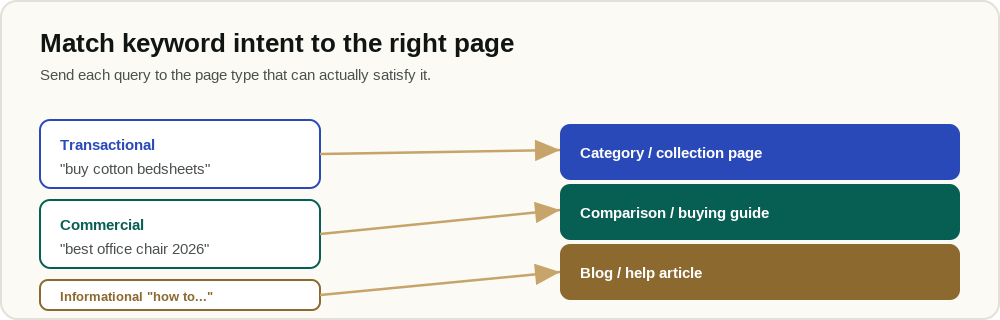
Start by understanding what customers are trying to find. Search queries may refer to a broad product type, a material, a use case, a room, a style, a size, a brand, or a specific technical requirement. The architecture should help customers move naturally between these needs.
Build a category and subcategory map
Create an inventory of the current category URLs and record:
This map helps identify important categories with poor visibility, overlapping pages targeting the same intent, orphaned categories, and unnecessary layers in the navigation.
- Category name and parent category
- Main product types and assortment size
- Main customer use case
- Relevant search themes and queries
- Organic impressions and clicks where available
- Revenue or strategic importance where available
- Indexation and canonical status
- Overlap with other categories
- Whether the category is permanent, seasonal, or temporary
Avoid creating a page for every keyword variation
A common mistake is creating separate category URLs for every near-identical phrase. If the pages contain the same products and serve the same intent, they may compete with each other and create maintenance overhead.
A separate landing page is more defensible when it serves a meaningfully different user need, offers a useful and distinct product set, and can be maintained accurately. Do not create a category solely because a keyword tool reports a phrase.
Use customer language without sacrificing clarity
Compare internal search terms, customer questions, merchandising language, and relevant query data. If customers use a term that differs from internal product taxonomy, explain the relationship in a clear heading or supporting copy. Avoid awkward keyword strings that make the category name less understandable.
3. Optimise category titles, headings, and metadata
Page title
Write a unique, descriptive title that clearly identifies the category. Include a meaningful modifier when it helps distinguish the assortment, such as product type, material, audience, or use case. Keep it readable and avoid repeating the same term several times.
Main heading
The main on-page heading should confirm that visitors have reached the right category. It should use natural customer-facing language and align with the products actually shown. Do not use a broad heading for a narrow assortment if it creates a misleading promise.
Meta description
Summarise what the category offers and, where useful, mention a relevant selection attribute or shopping benefit. Treat the description as a useful snippet suggestion rather than a guaranteed search result. Search engines can choose different text based on the query.
Supporting headings
Use headings to organise genuinely useful information, such as a buying guide, category differences, sizing, materials, or common selection questions. Heading hierarchy should reflect the page structure, not be used as a mechanism for inserting every keyword variation.
Image and link text
Category banners should be relevant to the category and should not obscure navigation or product discovery. Use descriptive alt text for meaningful images and useful anchor text for category links. Avoid repeating keyword-heavy phrases across every link.
4. Write useful category-page content
Category content should help customers understand the assortment or choose between products. It should not exist only to make a page longer.
Depending on the category, useful content may include:
- A short introduction explaining what the category contains
- Key differences between product types or materials
- Selection advice based on use case
- Size, fit, dimension, or compatibility guidance
- Care, installation, or maintenance considerations
- Links to detailed buying guides
- Answers to recurring customer questions
- Clear explanations of category-specific terminology
Place content where it supports the shopping task
A concise introduction near the top can orient visitors. More detailed guidance may work below the product grid, in expandable sections, or on a linked buying guide, provided the content remains accessible and does not create a poor experience.
There is no universal word-count target for every category page. A simple category may need only a clear heading and a short explanation. A complex category with many materials, sizes, or technical options may need more extensive guidance. Let the customer’s decision process determine the amount of content.
Make each category distinct
Avoid copying the same paragraph across dozens of pages and replacing only the product keyword. Write about the actual products, selection criteria, and questions relevant to each category. If there is nothing meaningfully different to say, reconsider whether the page needs to exist as a separate SEO landing page.
Support claims with evidence
Do not make unverified claims about sustainability, certifications, performance, safety, health benefits, or product origin. Category copy should accurately represent the products currently available. Ensure that claims remain valid as the assortment changes.
Create an explicit URL policy
For each filter type, decide whether the resulting page should be:
Do not apply one blanket rule without considering the platform and use case. Some filtered pages can satisfy a distinct search intent; most combinations may not deserve independent indexation.
- A normal user-facing filter state that is not intended to become a separate search landing page
- A carefully selected, indexable landing page with distinct value and demand
- A temporary state that should not be linked as a crawlable URL
- A parameter combination that should be consolidated according to the site’s canonical strategy
Common risks
A robust approach begins with a crawl and URL inventory, then defines the intended behaviour for each parameter family. Validate the implementation after deployment.
- Multiple parameter orders creating duplicate URLs
- Sorting parameters creating crawlable duplicates
- Filter combinations with no products or very few products
- Internal links pointing to many low-value combinations
- Canonical tags that conflict with internal linking or sitemap signals
- Blocking URLs without understanding how the platform uses them
Keep filters useful for people
SEO controls should not break the shopping experience. Customers should still be able to filter, sort, clear selections, and understand the number of matching products. Test browser history, shareable filter states where supported, keyboard navigation, and mobile interactions.
7. Improve product listing usability
A category page is a decision-making interface, not just a collection of links. Product cards and controls should provide enough information to help users choose what to open.
Review the following elements:
Avoid overcrowding product cards with badges, promotional labels, or tiny text. The most important information should be easy to scan. Product listing design should reflect how customers compare items in that category.
- Product image clarity and consistent cropping
- Product name and meaningful differentiators
- Price and accurate discount presentation
- Availability where relevant
- Variant indicators when useful
- Review information only when genuine and properly represented
- Clear navigation to product details
- Filter and sort controls that work on mobile
- Useful empty states when no products match
- Pagination or “load more” behaviour that remains accessible
Sort options
Default sorting should make sense for the category and business model. If “featured” or “recommended” sorting is used, define what it means operationally and ensure it does not mislead customers. Sorting should not create unnecessary indexable URLs or alter canonical signals unpredictably.
Out-of-stock products
Decide how unavailable products should be presented. If restock is expected, a back-in-stock option or clear availability message may help. If an item is discontinued, consider whether the URL still has user or search value and whether a relevant alternative exists. Avoid automatically redirecting every unavailable product to the homepage or an unrelated category.
8. Manage indexation, canonicals, and pagination
Indexation
Check that priority category pages are indexable and included in the intended sitemap. Review robots directives, HTTP status codes, canonical tags, rendering, and internal links. Do not assume a page is indexed merely because it appears in a sitemap.
Canonical tags
Canonical tags help indicate a preferred URL among duplicate or very similar pages. They are signals, not a substitute for coherent architecture. Ensure canonical targets are valid, indexable, and representative of the page. Avoid canonicalising a distinct category to an unrelated parent simply because it is convenient.
Pagination
Large categories may be split across multiple pages. Make sure products beyond the first page can be discovered through crawlable links and that pagination works for users. Do not assume that a search engine will discover every product if the interface relies entirely on a client-side button without accessible links or other discovery paths.
Follow current search engine guidance for pagination and avoid relying on outdated assumptions about special pagination tags. Test the actual page URLs, canonical behaviour, and links between result pages.
XML sitemaps and monitoring
Include canonical, indexable URLs that you want search engines to discover. Remove accidental parameter variants from sitemaps. After major architecture changes, monitor indexing, crawling, clicks, and impressions in Search Console. A sitemap is a discovery aid, not a guarantee of indexation.
9. Measure category-page performance
Use multiple signals to understand whether a category page is helping both discovery and shopping.
Use consistent definitions and compare similar time periods. Segment by device, traffic source, category, promotion, product availability, and seasonality where relevant. Category pages can differ substantially in assortment size and purchase intent, so a single benchmark may be misleading.
| Area | Measures to review | Questions to ask |
|---|---|---|
| Organic visibility | Impressions, clicks, CTR, query mix | Does the page match the queries it appears for? |
| Indexation | Indexed status, canonical selection, crawl errors | Is the intended URL discoverable and consolidated correctly? |
| Navigation | Category entry sessions, click depth, subcategory clicks | Can visitors reach relevant products and subcategories? |
| Product discovery | Product-card clicks, filter usage, search refinement | Can visitors narrow the assortment successfully? |
| Purchase intent | Add-to-cart activity from category journeys | Are visitors finding products that fit their needs? |
| Commercial outcomes | Revenue, conversion rate, revenue per session | Does the category contribute to useful business outcomes? |
| Quality guardrails | Returns, cancellations, customer questions | Are product expectations clear and accurate? |
| Technical experience | Mobile usability, loading performance, interaction errors | Do technical issues interrupt discovery? |
Diagnose the funnel
If impressions are low, investigate demand, page relevance, internal linking, indexation, and competition. If impressions are healthy but clicks are weak, review the page title, snippet relevance, and query mix. If organic visitors arrive but rarely open products, inspect assortment fit, product-card clarity, price presentation, and category content. If product clicks are strong but purchases are weak, the issue may be on product pages, checkout, availability, or offer competitiveness.
Treat these patterns as diagnostic clues, not proof of a single cause. Verify them with page-level data and user feedback before making large changes.
10. A 30-day optimisation plan
Week 1: Audit and prioritise
Deliverable: A prioritised category-page audit with issues grouped by SEO, content, navigation, technical architecture, and conversion usability.
- Export or crawl the category URL inventory.
- Identify priority categories by business importance and search opportunity.
- Review query data, indexation, canonicals, and internal links.
- Inspect category filters and parameter-generated URLs.
- Collect customer questions and common product-selection problems.
Week 2: Improve priority pages
Deliverable: A documented set of improvements to a small group of high-priority categories.
- Rewrite unclear page titles and headings.
- Add concise, category-specific introductory content where useful.
- Improve category and subcategory internal links.
- Add or improve selection guidance and buying-guide links.
- Review product-card information and filter usability.
Week 3: Address technical controls
Deliverable: A validated technical change list and QA record.
- Define indexation rules for filter and sorting parameters.
- Check canonical tags and sitemap inclusion.
- Validate pagination and product discovery paths.
- Review breadcrumbs and structured data where applicable.
- Test mobile behaviour and crawlability after implementation.
Week 4: Evaluate and systematise
Deliverable: A results summary and repeatable category optimisation workflow.
The 30-day plan is a practical starting sequence, not a guarantee of ranking or revenue improvement within a fixed period. Results depend on the site, competition, catalogue, traffic, development resources, and implementation quality.
- Compare search visibility and user behaviour against a suitable baseline.
- Check for unintended effects on indexation or navigation.
- Document what changed and what remains uncertain.
- Create reusable content templates and QA rules.
- Prioritise the next category group based on evidence.
11. Common category-page SEO mistakes
- 01Creating too many near-duplicate categories: Similar pages can overlap in purpose and create unnecessary maintenance.
- 02Writing generic SEO paragraphs: Content that does not help shoppers adds little value.
- 03Ignoring filter URL behaviour: Faceted navigation can create large numbers of low-value URLs.
- 04Leaving priority categories orphaned or buried: Users and search engines may struggle to discover them.
- 05Using vague headings and titles: Visitors may not understand what the category contains.
- 06Relying only on JavaScript interactions: Important links and product discovery paths should remain accessible and crawlable.
- 07Using inconsistent canonicals: Conflicting signals can make the intended URL unclear.
- 08Treating every category equally: Investment should reflect customer need and business value.
- 09Ignoring mobile filters and sorting: A category may be technically sound but frustrating to use.
- 10Measuring only rankings: Search visibility matters, but product discovery and downstream business outcomes matter too.
FAQ
Frequently asked questions
It is the process of improving category or collection pages so search engines can understand and discover them, while shoppers can navigate the assortment and find suitable products. It includes page content, metadata, internal links, URL architecture, indexation, and usability.
There is no universal word count. Include enough useful information to explain the category and help customers select products. A straightforward category may need only a short introduction, while a complex assortment may benefit from more detailed guidance or links to a buying guide.
Important, stable category pages that serve a clear user need may be good indexation candidates. Thin, duplicate, temporary, or low-value filter combinations may not be. Decide based on user value, distinct intent, product availability, and the overall site architecture.
Only selected filtered pages should be indexable when they offer distinct, useful landing-page value and can be maintained. Most filter combinations should have a deliberate crawl and canonical strategy rather than being indexed automatically.
They serve different purposes. Category pages help people explore and compare groups of products; product pages answer detailed questions about a specific item. A healthy ecommerce architecture supports both and links them clearly.
Check whether the assortment matches the incoming queries, whether the product cards communicate key differences, and whether filters, sorting, price, availability, and mobile layout work well. Review customer feedback and analytics before assuming the problem is SEO copy.
Structured data may be useful for applicable elements, such as breadcrumbs, when implemented according to current guidelines. Do not add product markup to a category page as if the entire listing were one product. Mark up the content that is actually present and supported.
Similar posts
CRO
Ecommerce Product Page Optimisation: SEO, UX, and Conversion Checklist
Learn how to optimise ecommerce product pages for search visibility, customer confidence, and conversions with a practical product-page checklist.
17 min read
SEO
Ecommerce Internal Linking Strategy: A Practical Framework for SEO and Product Discovery
Build a stronger ecommerce internal linking strategy with practical guidance for categories, products, buying guides, breadcrumbs, and crawlable site architecture.
10 min read

SEO
Ecommerce SEO: The Complete Guide to Growing Organic Revenue
Learn how to grow ecommerce organic revenue with category SEO, product pages, technical SEO, structured data, internal linking, content strategy and measurement.
24 min read
Related services
Related work