Technical SEO
Ecommerce SEO for Product Variants: URLs, Canonicals, and Structured Data


Learn how to manage ecommerce product variants for SEO, including URL strategy, canonical tags, internal links, product structured data, and indexation.
Quick answer
No. A separate URL is most useful when the variant has a meaningful independent purpose and can be represented accurately. Simple colour or size options may be better handled within one product URL.
Key takeaways
- Ecommerce products often come in different sizes, colours, materials, capacities, pack sizes, finishes, or configurations.
- Start with the customer and product model, not the CMS setting.
- A single URL may be appropriate when colours or sizes are options within one product, the core content and search intent are the same, and the page can clearly show the selected option.
- A separate URL may be useful when a variant has a materially different product identity, distinct demand, a unique set of specifications, a separate image set, or a different purchase journey.
1. Why product variants create SEO complexity
Ecommerce products often come in different sizes, colours, materials, capacities, pack sizes, finishes, or configurations. These options are important to customers, but they can create technical SEO challenges when every selection generates a URL or when the page fails to communicate which variant is being viewed.
Common problems include:
The goal is not to index every possible combination. The goal is to make important product choices accessible, clear, technically consistent, and discoverable where they have genuine search value.
- Many URLs that show almost identical content.
- Variant selections that change the page visually but are not represented in a crawlable URL.
- Canonical tags that point to a different variant even when the current variant has a distinct search purpose.
- Product feeds and structured data that disagree with the visible price, image, or availability.
- Internal links that repeatedly point to parameter URLs rather than the preferred product URL.
- Search engines discovering combinations that add little value to shoppers.
2. First decide whether variants deserve separate URLs
Start with the customer and product model, not the CMS setting.
Keep one main product URL when variants are simple options
A single URL may be appropriate when colours or sizes are options within one product, the core content and search intent are the same, and the page can clearly show the selected option. The page should let users select the option, understand availability, and purchase the correct variant without confusion.
Consider distinct URLs when a variant has a meaningful independent purpose
A separate URL may be useful when a variant has a materially different product identity, distinct demand, a unique set of specifications, a separate image set, or a different purchase journey. Examples can include a different capacity with distinct specifications or a configuration that customers actively search for as a standalone item.
These are evaluation signals, not automatic rules. Separate URLs can still create duplication or management overhead. Confirm that each page can offer distinct value and remain maintained.
Ask five questions
If the answers are mostly no, a single product URL with clear variant selection may be simpler. If the answers are yes, assess a dedicated URL and how it will be canonicalised, linked, and represented in structured data.
- 01Do customers search for this variant specifically?
- 02Is its intent or specification materially different from other variants?
- 03Can the site show the selected variant reliably on its own URL?
- 04Can price, availability, image, SKU, and other relevant data remain consistent?
- 05Is there a business reason to maintain a separate landing page?
3. Choose a URL and canonical strategy
There is no universal URL format for all ecommerce platforms. What matters is that the URL behaves predictably, resolves to the intended product or variant, and does not create unnecessary crawlable combinations.
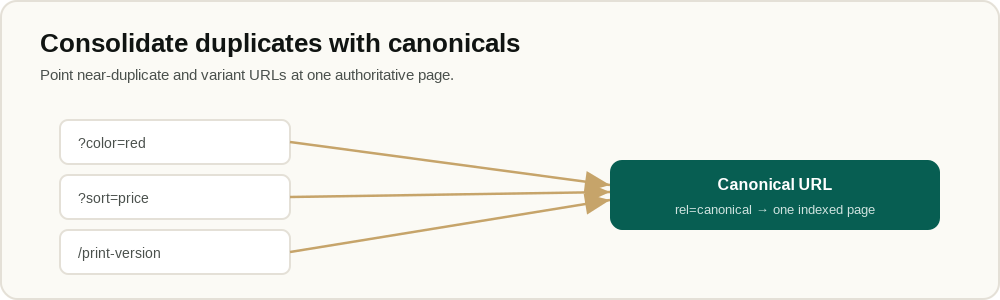
Strategy A: One canonical product URL
Use the main product URL as the preferred URL when variants are merely selectable options and do not need separate search landing pages. Variant selection can be handled through the page interface, provided users can identify and purchase the chosen option correctly.
Strategy B: Dedicated URLs for meaningful variants
Use distinct, stable URLs only where each variant merits a separate landing page. Each URL should display the correct variant by default and have a clear relationship to the parent product and sibling variants. Decide canonical handling deliberately; do not copy a default canonical tag without confirming it matches the intended indexing strategy.
Strategy C: Query parameters for selected options
Some platforms use parameters to preserve a selected colour, size, or SKU. Review how these URLs behave:
Do not block all parameter URLs reflexively. First understand which parameters represent useful product state and which create tracking, sorting, filtering, or duplicate combinations.
- Do they load the intended variant on direct visit?
- Are they linked internally in a controlled way?
- Do they create numerous combinations or tracking variations?
- Is there a consistent canonical policy?
- Do they work when JavaScript has not yet completed?
Canonical tags are signals, not a substitute for strategy
A canonical tag helps communicate a preferred URL among duplicate or similar pages, but it does not fix an incorrect page experience, broken variant selection, or contradictory internal links. Use it consistently with redirects, internal links, and sitemap inclusion.
For example, if all variants are intended to be represented by one main product URL, point relevant duplicate or near-duplicate URLs to the selected canonical according to the platform's implementation. If separate variant pages are intentionally indexable, evaluate whether each should canonicalise to itself or whether a parent URL is the correct representative. The answer depends on the actual content and search intent; verify rather than assume.
4. Make product content useful and unambiguous
Whether variants share one URL or have separate URLs, customers should know exactly what they are viewing.
Show the selected variant clearly
- Make the selected colour, size, capacity, material, or configuration visible.
- Ensure the main image changes when a visual variant is selected.
- Display the correct price and availability for the chosen option.
- Make the selected option persist on reload or direct URL visit where supported.
- Ensure add-to-cart actions submit the intended SKU or variant identifier.
- Explain compatibility or sizing differences where these affect purchase decisions.
Avoid misleading near-duplicate pages
If each variant has its own URL, do not simply generate pages with a changed colour word and otherwise identical, generic copy if the differences matter to customers. Include accurate variant-specific images, identifiers, attributes, availability, and useful details. Do not invent differences just to make pages look unique.
Keep titles and headings accurate
A title should identify the product clearly and include a distinguishing variant attribute when that helps users understand the result. Avoid creating dozens of mechanically repetitive titles with no useful differentiation. The H1, selected option, visible price, image, and structured data should agree.
7. A practical variant SEO audit
Step 1: Export a representative sample
Include best sellers, products with many variants, products with limited availability, and products that have separate variant URLs. For large catalogues, sample by template and variant type before scaling the audit.
Step 2: Record the current behaviour
For each sample, capture:
- Main product URL and variant URL patterns.
- HTTP status and redirect behaviour.
- Canonical target.
- Indexability and robots directives.
- Title, H1, selected option, and visible price.
- Variant-specific image, SKU, and availability.
- Internal links and sitemap inclusion.
- Structured data and feed values.
- Search Console clicks and impressions where available.
Step 3: Classify URL types
Separate main product URLs, intentional variant URLs, parameter duplicates, tracking URLs, and invalid combinations. Record the expected behaviour for each type.
Step 4: Agree the policy with ecommerce and development
Confirm which variants need separate landing pages, how URLs are generated, how canonical tags are set, and how structured data is built. Include merchandising and feed owners when availability and SKU data are involved.
Step 5: Test before applying sitewide
Test a small group across relevant templates and devices. Verify direct access, variant selection, canonical tags, internal links, structured data, and purchase behaviour. Check that no unintended redirects or indexing blocks are introduced.
Step 6: Monitor and document
After deployment, monitor representative URLs in Search Console, review indexing and crawl patterns, and inspect organic landing-page behaviour. Record what changed and when. Use the findings to refine the policy rather than repeatedly changing URL rules without evidence.
8. Common implementation mistakes
- Indexing every combination: can create a large number of low-value URLs.
- Canonicalising every variant to the parent automatically: may be unsuitable when a variant genuinely serves a distinct purpose.
- Creating separate URLs without a reason: increases duplication and maintenance burden.
- Using one URL that cannot preserve the selected variant: creates confusion when users share or revisit a product choice.
- Mismatch between selected variant and structured data: can make product information unreliable.
- Variant pages with incorrect prices or stock: damages customer trust and can create feed discrepancies.
- Blocking parameters before auditing them: may prevent discovery of useful product states or interfere with canonical handling.
- Treating product variants and category filters as identical: overlooks their different roles in navigation and search intent.
- Changing URL rules without testing: risks broken links, redirect chains, and unintended indexation changes.
FAQ
Frequently asked questions
No. A separate URL is most useful when the variant has a meaningful independent purpose and can be represented accurately. Simple colour or size options may be better handled within one product URL.
Canonical handling depends on the chosen URL strategy. Similar variant URLs may need to consolidate to a preferred product URL, while intentionally distinct pages may require a different approach. Check the content, search intent, and platform behaviour before deciding.
They may be eligible to appear when their URLs and content are accessible and useful, but separate URLs do not guarantee separate rankings. Avoid creating variant pages solely to multiply keyword targets.
ProductGroup is a structured-data model used to describe a group of related product variants and their shared or variant-specific properties. Follow Google's current product-variant documentation and validate the actual implementation.
Include only URLs that are canonical and intentionally intended for indexing. If the site uses one preferred product URL for all options, avoid listing duplicate parameter URLs as though each were a separate canonical page.
Not necessarily. Write useful, accurate content for the actual product and explain differences where they affect selection. Do not manufacture repetitive copy simply to make each option appear unique.
Similar posts

Technical SEO
Ecommerce SEO for Duplicate Content: Canonicals, Consolidation, and Indexation
Learn how to diagnose ecommerce duplicate content, choose canonical URLs, consolidate similar pages, and manage parameters without harming product discovery.
10 min read
Technical SEO
Ecommerce SEO for Large Catalogues: Managing Faceted Navigation, Crawl Budget, and Indexation
10 min read

SEO
Ecommerce SEO: The Complete Guide to Growing Organic Revenue
Learn how to grow ecommerce organic revenue with category SEO, product pages, technical SEO, structured data, internal linking, content strategy and measurement.
24 min read
Related services
Related work