Technical SEO
Ecommerce SEO for Duplicate Content: Canonicals, Consolidation, and Indexation


Learn how to diagnose ecommerce duplicate content, choose canonical URLs, consolidate similar pages, and manage parameters without harming product discovery.
Quick answer
Duplicate or similar content is common on ecommerce sites and does not automatically mean a penalty. The practical task is to help search engines find the preferred version and ensure pages offer clear value.
Key takeaways
- Ecommerce sites can expose the same or substantially similar content through multiple URLs.
- Start by identifying the URL pattern, not by applying canonical tags everywhere.
- The preferred URL should be stable, useful, accessible, and consistent with how the site wants to organise its information.
- A canonical tag may help consolidate duplicate URL versions.
1. What duplicate content means in ecommerce
Ecommerce sites can expose the same or substantially similar content through multiple URLs. Common examples include:
Duplicate content is not automatically a penalty or a reason to delete pages. The practical challenge is to help search engines identify the preferred URL, reduce unnecessary crawling of low-value combinations, and preserve useful pages that serve distinct customer needs.
Do not confuse similar content with identical URLs or assume that every page with repeated product descriptions is a canonicalisation problem. A store may have legitimate reasons to offer similar products or filters. Diagnose the cause and user purpose before changing the site.
- A product accessible through more than one category path.
- URLs with tracking or session parameters.
- Sorting and filtering combinations that create many URL variations.
- HTTP and HTTPS, or www and non-www versions, when site configuration allows both.
- Product variants or pagination patterns that overlap.
- Similar category pages created by minor filter combinations.
- Old URLs that remain accessible after a migration or product catalogue change.
2. Find the source before choosing a fix
Start by identifying the URL pattern, not by applying canonical tags everywhere.
Ask what creates the duplicate
- Does the CMS generate multiple routes to one product?
- Are tracking parameters creating crawlable variations?
- Do filters and sorting combinations change the content meaningfully?
- Does a product variant have a distinct purpose or merely a selected option?
- Did a migration leave old URLs, redirect chains, or inconsistent internal links?
- Are multiple hostnames or protocols serving the same page?
- Are printer-friendly, session, or campaign URLs accessible to crawlers?
Decide which version should represent the content
The preferred URL should be stable, useful, accessible, and consistent with how the site wants to organise its information. It should not be selected solely because it is shorter or because a spreadsheet labels it “main URL.”
Separate technical duplication from content quality
A canonical tag may help consolidate duplicate URL versions. It does not make a thin page useful, improve weak product information, or solve a category page that lacks a clear purpose. If two pages target different needs, improve their usefulness and clarify their relationship rather than merging them blindly.
3. Canonical tags: purpose and limits
A canonical link element communicates the URL a site prefers search engines to treat as the representative version among duplicate or very similar pages. Search engines may consider it alongside other signals; it is not an absolute command.
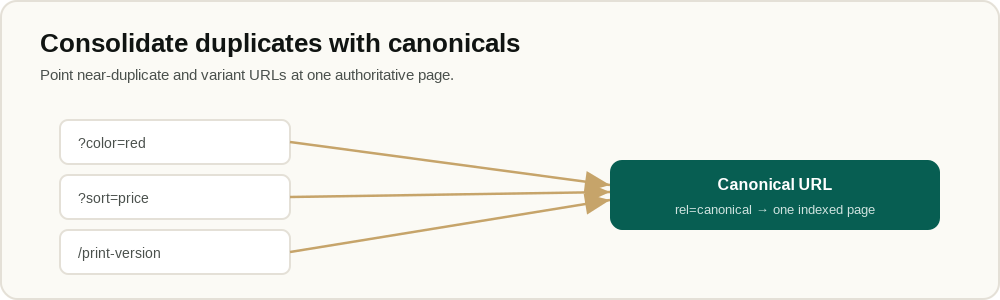
Canonical implementation checklist
- Return the intended HTTP status for the page.
- Use an absolute canonical URL that resolves successfully.
- Keep canonical targets consistent with redirects and internal links.
- Avoid canonicalising a page to an unrelated destination.
- Avoid chains in which one canonical points to a URL that points elsewhere.
- Ensure the preferred URL is not accidentally blocked from crawling.
- Include preferred canonical URLs, not duplicate variants, in the XML sitemap.
- Check canonical tags in the rendered HTML where the platform uses client-side rendering.
Self-referencing canonicals
A self-referencing canonical can help make the preferred URL explicit on a page intended to be canonical. Confirm that the URL is the version you actually want indexed and that the site does not generate conflicting canonical tags.
Canonical tags are not redirects
A canonical does not send visitors to another URL. If users should no longer access the old URL and a relevant replacement exists, a redirect may be the better solution. If both URLs need to remain accessible for different user tasks, canonicalisation may be more appropriate, depending on how similar the pages are.
4. Parameters, filters, and sorting URLs
Parameters are a common source of ecommerce URL duplication, but they should be audited by function.
Tracking parameters
Campaign tags and other analytics parameters often do not change the underlying product or category content. Make sure internal links do not multiply unnecessary parameter variants, and ensure the preferred URL is clear.
Sorting parameters
Sorting by price, popularity, or newest arrival may rearrange the same product set. Decide whether these URLs need to be independently discoverable. In many cases, the default category URL should remain the primary search landing page, while sorting is a user interface function.
Filter and facet parameters
Filters may create useful landing pages for shoppers, for example, a meaningful product type or material, or an enormous number of low-value combinations. Evaluate them based on search demand, distinct content, inventory stability, and user value. Do not automatically index every combination or automatically block all filters.
Session and internal state parameters
Review whether these URLs are required for the user experience. Avoid exposing session identifiers in crawlable links where possible, and ensure they do not create endless duplicate routes.
Test before implementing a broad rule
Sample real URLs and record the page content, status code, canonical target, robots directives, internal links, and sitemap status. Rules written from parameter names alone can accidentally affect useful URLs.
5. Similar product and category pages
Duplicate product pages
If the same product appears under several category paths, decide on a stable product URL and use it consistently in internal links, structured data, and sitemaps. Avoid maintaining multiple indexable versions merely because the platform includes the category name in the route.
If two products are genuinely different, do not canonicalise one to the other simply because descriptions overlap. Improve the product-specific information, such as dimensions, materials, compatibility, included components, or use cases, where these differences are real and useful.
Similar category pages
Category pages may share products and wording while serving distinct shopping tasks. Review whether each page has a clear purpose and a sufficiently useful product set. If two pages are effectively interchangeable, consolidation may be appropriate. If they serve distinct intent, improve their differentiation rather than forcing them into one URL.
Product variants
Colour, size, capacity, and configuration options need a deliberate policy. Some sites should use one product URL with selectable variants; others may have meaningful variant-specific pages. Apply the variant strategy consistently with canonical tags, internal links, structured data, and feeds.
Pagination and infinite scroll
Make sure important products remain discoverable through crawlable links and that pagination does not accidentally create duplicate or inaccessible page states. Follow current search engine documentation for pagination and JavaScript behaviour; do not rely on obsolete implementation patterns without validation.
6. Consolidation, redirects, and removals
Choose the action that fits the actual problem.
A redirect is usually a stronger user-facing change than a canonical signal: it changes where the visitor lands. Use redirects when the old URL should resolve to a replacement, not as a shortcut for every similar page.
| Problem | Potential action | Check before deploying |
|---|---|---|
| Same content available at multiple URLs | Canonicalise to preferred URL or redirect where appropriate | Confirm the URLs are truly duplicate or near-duplicate |
| Old URL has a direct replacement | Permanent redirect | Destination must satisfy the original intent |
| Duplicate tracking variation | Canonical consistency and cleaner internal linking | Ensure tracking still works as required |
| Low-value filter combinations | Control crawl paths and indexing according to policy | Keep useful filter journeys available to shoppers |
| Two pages serve the same purpose | Consolidate content and redirect one if appropriate | Preserve important information and relevant links |
| Page has no replacement and no continuing value | Appropriate 404/410 and link cleanup | Remove obsolete sitemap entries and internal links |
| Distinct products with overlapping copy | Improve product-specific content | Do not merge genuinely different products |
8. A step-by-step audit workflow
Step 1: Collect URL evidence
Use a crawl and exports from Search Console, analytics, and the CMS where available. Capture:
- URL and page template.
- HTTP status and redirect destination.
- Canonical target.
- Indexability and robots directives.
- Title, H1, and key content similarities.
- Internal links and sitemap inclusion.
- Organic clicks and impressions.
- Product or category purpose.
- Parameters and the system that generates them.
Step 2: Group URLs by pattern
Cluster URLs into product route duplicates, tracking parameters, sorting, filters, variants, legacy URLs, and host/protocol versions. Review examples from each group instead of treating all URLs alike.
Step 3: Define the preferred URL policy
Document the canonical URL rules for each template and parameter class. Include exceptions for pages with distinct user or search value.
Step 4: Agree changes with development and merchandising
Confirm that the proposed rules will not break filters, product selection, tracking, stock handling, or campaign landing pages. Identify who owns exceptions and how future products will follow the policy.
Step 5: Test a small sample
Check response codes, canonical tags, redirects, robots directives, rendered content, internal links, sitemap entries, and purchase flows. Test both representative examples and edge cases.
Step 6: Deploy and monitor
Record the release date. Monitor Search Console indexing and canonical reports, crawl patterns, organic landing pages, and relevant conversions. Investigate unexpected changes before expanding the rule to more templates.
9. Common mistakes
- Canonicalising unrelated pages: a category page is not a suitable canonical destination for every product.
- Treating canonicals as guaranteed directives: search engines can choose a different canonical.
- Blocking URLs before auditing them: this can hide signals and affect useful discovery.
- Leaving internal links pointing to duplicates: sends inconsistent signals and wastes crawl paths.
- Listing non-canonical URLs in sitemaps: conflicts with the preferred URL policy.
- Consolidating pages with different intent: can remove useful information or shopping paths.
- Using bulk rules without sampling: a parameter that is usually redundant may be meaningful in some templates.
- Ignoring product feeds and structured data: creates conflicting product identities and URLs.
- Measuring only the number of indexed URLs: fewer URLs are not automatically better if useful pages disappear.
FAQ
Frequently asked questions
Duplicate or similar content is common on ecommerce sites and does not automatically mean a penalty. The practical task is to help search engines find the preferred version and ensure pages offer clear value.
A consistent canonical policy is useful, but the right implementation depends on the page type and platform. Verify the actual canonical target rather than adding a generic tag without checking its effect.
Not always. Some filtered pages may serve a distinct and useful search purpose; many combinations may not. Assess demand, content, inventory, and user value before deciding how each filter class should behave.
They solve different problems. A redirect sends users to another URL; a canonical signals the preferred URL while leaving the page accessible. Choose based on whether the old URL should remain accessible and whether the pages are genuinely equivalent.
Do not apply a blanket rule without analysis. Blocking can prevent crawlers from seeing page-level canonical signals. First define the desired indexing and crawling behaviour and test the implementation.
Combine a site crawl with Search Console, analytics, CMS exports, and URL-pattern analysis. Group URLs by their cause, then inspect status codes, canonical tags, page content, internal links, and sitemap inclusion.
Similar posts

Technical SEO
Ecommerce SEO for Product Variants: URLs, Canonicals, and Structured Data
Learn how to manage ecommerce product variants for SEO, including URL strategy, canonical tags, internal links, product structured data, and indexation.
9 min read

Technical SEO
Ecommerce SEO for Large Catalogues: Managing Faceted Navigation, Crawl Budget, and Indexation
10 min read

SEO
Ecommerce SEO: The Complete Guide to Growing Organic Revenue
Learn how to grow ecommerce organic revenue with category SEO, product pages, technical SEO, structured data, internal linking, content strategy and measurement.
24 min read
Related services
Related work