SEO
Ecommerce Internal Linking Strategy: A Practical Framework for SEO and Product Discovery

Internal links connect pages within the same website. In ecommerce, they do more than help visitors move around. They support product discovery, communicate relationships between categories and products, help search engines discover URLs, and guide customers from broad research toward specific buying decisions. A store can have strong product pages and useful editorial content yet still make important pages difficult to discover. Priority categories may be buried too deep in navigation. Product pages may have no clear route back to their category. Buying guides may attract relevant organic traffic but fail to connect readers to suitable products. Large catalogues can also contain orphaned pages, inconsistent breadcrumbs, and repetitive links that add little value. A useful internal linking strategy is not about adding the maximum number of links. It is about creating clear, relevant paths for users and search engines while keeping the information architecture manageable. My framework is Diagnose → Acquire → Convert → Scale → Compound. Applied to internal linking, it means auditing current discovery paths, connecting relevant pages, making product selection easier, establishing repeatable rules for large catalogues, and improving the system as the site grows.
Quick answer
It is a plan for how pages within an ecommerce website link to one another so users can discover relevant information and products, while search engines can find and interpret important URLs. It includes navigation, breadcrumbs, category-to-product links, editorial links, and related-product paths.
Key takeaways
- Start by understanding the current structure rather than adding links page by page without a plan.
- Record the following for key URLs:
- A visual map can expose gaps that a spreadsheet hides.
- Not every URL needs the same internal-link investment.
2. Map the site architecture
Start by understanding the current structure rather than adding links page by page without a plan.
A common pattern is:
Actual structures vary. Some stores have brand hubs, product families, room or use-case collections, or other navigation layers. The objective is to make those relationships understandable and useful, not to force every site into the same hierarchy.
- Homepage
- Main category pages
- Subcategory or collection pages
- Product detail pages
- Supporting buying guides and editorial content
- Useful brand, comparison, or service pages where relevant
Create a page inventory
Record the following for key URLs:
Combine crawl data with sitemaps, Search Console, analytics landing pages, and known business-critical URLs. No single source necessarily reveals every useful page or relationship.
- URL and page type
- Parent category or topic
- Indexability and canonical status
- Current internal links in and out
- Click depth from important entry points
- Search visibility and traffic where available
- Commercial or strategic importance where available
- Relevant pages that should link to it
- Existing issues and proposed actions
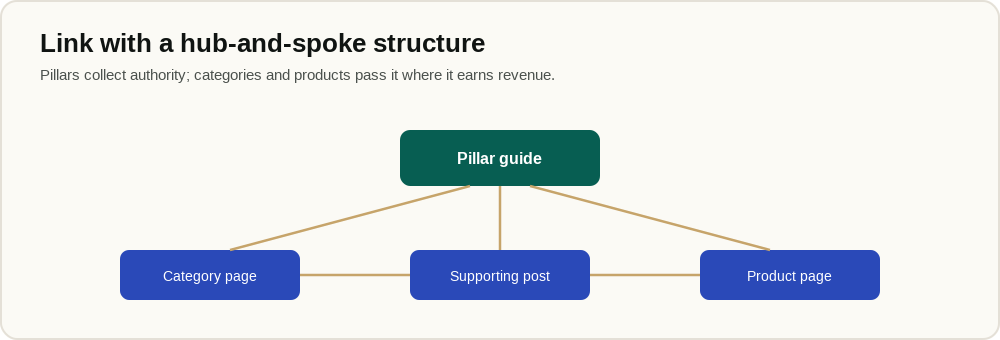
Draw a simple relationship map
A visual map can expose gaps that a spreadsheet hides. For example, a buying guide about choosing a mattress should link to relevant mattress categories or products; those categories may link back to the guide where it helps customers compare options. Product pages should have a sensible route to their category or collection.
The relationship should be based on user need and the actual assortment. Do not create a link simply because two pages share a keyword.
3. Prioritise pages that matter
Not every URL needs the same internal-link investment. Prioritise pages based on a combination of customer value, search opportunity, business importance, and current discoverability.
Useful priority signals include:
Do not use revenue alone. Some informational pages help customers understand complex products; some low-traffic pages are essential for navigation or compliance. Use context when assigning priority.
A practical prioritisation model can score each page on business importance, search opportunity, user value, and current link accessibility. Keep the scoring simple enough that the team can maintain it.
- Important category or product pages with strong business value
- Pages with search impressions but limited internal discovery
- Pages receiving organic traffic that should guide visitors to relevant products
- Useful guides that lack contextual links to relevant categories
- Pages with external links or a meaningful history that are hard to reach internally
- Orphaned or deeply buried pages that should remain accessible
- Newly launched priority pages that need clear routes into the site
4. Build the main ecommerce linking patterns
Homepage to priority categories
Use primary navigation and other appropriate homepage links to expose major product groups. Do not attempt to link to every product from the homepage. The purpose is to communicate the top-level structure and provide useful entry points.
Parent categories to subcategories
A parent category should make relevant subcategories discoverable where they help users narrow the assortment. Use clear labels and avoid linking to empty or irrelevant collections without a reason.
Categories to products
Product listing cards should link to the relevant product detail pages using ordinary, accessible links. Ensure important products are discoverable through category pages and not solely through internal search or personalised recommendations.
Products back to categories
Breadcrumbs and other useful navigation elements can help visitors return to the broader category. Product pages may also link to related products, compatible accessories, or buying guides when the relationship is meaningful.
Buying guides to products and categories
Editorial content should connect advice to relevant next steps. A guide comparing product materials can link to the appropriate category or product range. The link should fit the paragraph and help the reader act on the information.
Related products and complementary items
Recommendations can help users compare alternatives or discover compatible items. Keep them relevant, label the relationship clearly, and ensure the links are crawlable. Avoid generating endless, low-value cross-links among unrelated products.
Brand and use-case pages
Where customers genuinely shop by brand, room, activity, material, or use case, those pages may form useful paths into the catalogue. Create and link them when they support a distinct shopping need, not simply to multiply URLs.
5. Use descriptive anchor text naturally
Anchor text helps users understand a link before they click. It can also provide context about the destination.
Prefer clear labels such as “linen duvet covers,” “mattress size guide,” or “care instructions for this fabric” when those descriptions accurately represent the destination. The exact wording should fit the sentence and page.
Avoid:
Use consistent labels for the same destination when that improves usability, but do not force every link to use identical anchor text. Natural language and clear user expectations matter more than a mechanical keyword formula.
- Repeating the same exact-match phrase unnaturally in every link
- Using vague labels such as “click here” when a descriptive label would help
- Linking words that do not accurately describe the destination
- Adding keyword lists to navigation labels
- Making an entire long paragraph a link when a short phrase is clearer
6. Find and fix orphaned pages
An orphaned page has no meaningful internal links pointing to it from the rest of the site. It may still appear in a sitemap or receive external traffic, but customers and crawlers may have difficulty discovering it through normal navigation.
How to identify potential orphans
Compare URL sets from several sources:
URLs that appear in sitemaps or analytics but are not discovered through the crawl deserve investigation. They may be true orphans, blocked by technical behaviour, or excluded from the crawl for another reason.
- 01Crawl the website by following internal links.
- 02Export URLs from XML sitemaps.
- 03Review landing pages in analytics.
- 04Review pages and queries in Search Console.
- 05Add known priority URLs from product, content, and merchandising systems.
How to fix them
First decide whether the page should remain live and indexable. If it has a valid purpose, add relevant links from appropriate categories, parent pages, buying guides, or related products. If it is obsolete or duplicative, choose a deliberate consolidation or removal approach instead of adding links to preserve a page that no longer serves users.
Do not fix every orphan by linking all of them from a generic “all pages” list. Repair the underlying architecture so that the page has a logical place in the site.
Use templates, but validate edge cases
Product templates can consistently include breadcrumbs, category links, and relevant related products. Category templates can link to parent categories, selected subcategories, and useful guides. Editorial templates can suggest related categories where relevant.
Templates must still handle edge cases: discontinued products, out-of-stock items, products in multiple categories, products with variants, and categories with no current inventory.
Keep filters purposeful
Filters can create a huge number of URL combinations. Internal links should not indiscriminately expose every possible combination to crawlers. Define which filtered landing pages offer distinct value and should be discoverable, and manage other parameter combinations according to the site’s crawl and canonical strategy.
Do not use internal linking as a substitute for an indexation policy. A filter URL can be useful to a shopper without necessarily needing to become an independent search landing page.
Avoid link explosions
Related-product modules, tags, brand links, and cross-category widgets can multiply links rapidly. Keep modules useful and predictable. Ensure that links do not lead to empty pages, irrelevant variants, or repetitive loops through near-duplicate categories.
10. A 30-day implementation plan
Week 1: Map and diagnose
Deliverable: A prioritised internal-link audit.
- Crawl the current site.
- Export sitemap and priority URL data.
- Identify major category, product, and editorial page groups.
- Flag orphan candidates and deeply buried priority pages.
- Review existing breadcrumbs and navigation.
Week 2: Fix high-value paths
Deliverable: A documented batch of internal-link improvements.
- Improve links from parent categories to relevant subcategories.
- Add contextual links from useful buying guides to relevant product groups.
- Repair missing product-to-category paths and breadcrumbs.
- Update broken links and remove unnecessary redirect hops.
- Improve unclear anchor text where it affects usability.
Week 3: Standardise templates and controls
Deliverable: Template rules and a QA checklist.
- Define rules for product, category, and editorial templates.
- Review related-product and complementary-item modules.
- Set policy for filter and sorting URL links.
- Validate mobile navigation and keyboard accessibility.
- Check edge cases such as discontinued and out-of-stock products.
Week 4: Validate and establish maintenance
Deliverable: A repeatable internal-link maintenance workflow.
This timeline is a practical starting point, not a guarantee of ranking or revenue improvement within 30 days. Scale it to catalogue size, development capacity, and the complexity of the current architecture.
- Re-crawl the site.
- Compare orphan candidates, click depth, and broken links.
- Review relevant search and user-navigation signals.
- Document remaining issues and their owners.
- Establish a process for checking links when products and categories change.
FAQ
Frequently asked questions
It is a plan for how pages within an ecommerce website link to one another so users can discover relevant information and products, while search engines can find and interpret important URLs. It includes navigation, breadcrumbs, category-to-product links, editorial links, and related-product paths.
There is no universal ideal number. Include links that are useful, relevant, and easy to navigate. The right quantity depends on the page’s purpose, content, and catalogue structure.
Internal links help search engines discover pages and understand relationships between them. They also help visitors navigate. They are one part of a wider SEO system and do not guarantee rankings.
An orphan page has no meaningful internal links pointing to it from other pages on the site. It may still be listed in a sitemap or receive external visits, but its place in the site architecture should be reviewed.
Product pages should generally provide a sensible route back to relevant categories or collections, often through breadcrumbs or other navigation. The exact structure depends on the site and product relationships.
Yes, when the links are relevant and help readers act on the guidance. Links should support the reader’s task rather than interrupt the content or exist only to repeat keywords.
They may help discovery if a page is difficult to reach, but they cannot resolve every indexation problem. Check the page’s status code, robots directives, canonical, content, rendering, and overall indexability.
Similar posts
SEO
Ecommerce Category Page SEO: How to Build Pages That Rank and Help Shoppers Choose
Learn how to optimise ecommerce category pages with better architecture, helpful copy, internal links, filters, and measurement.
15 min read

SEO
Ecommerce SEO Content Strategy: Build Useful Content That Supports Organic Growth
Build an ecommerce SEO content strategy with search-intent mapping, buying guides, category support, content quality checks, and measurement.
15 min read
SEO
Ecommerce SEO: The Complete Guide to Growing Organic Revenue
Learn how to grow ecommerce organic revenue with category SEO, product pages, technical SEO, structured data, internal linking, content strategy and measurement.
24 min read
Related services
Related work