CRO
Ecommerce Product Page Optimisation: SEO, UX, and Conversion Checklist

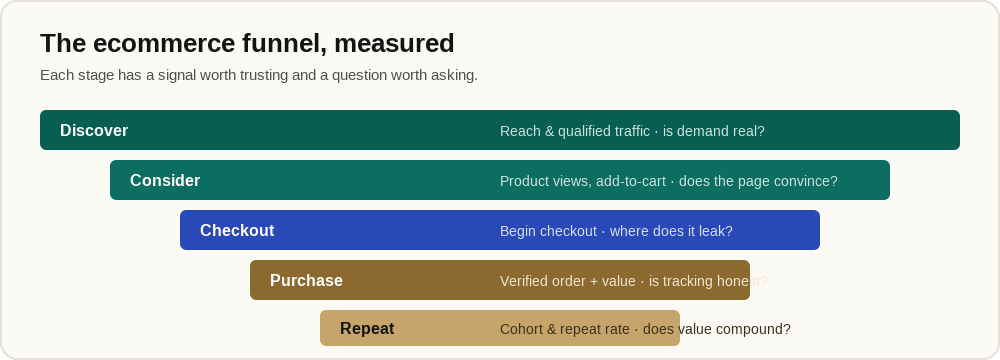
A product page has several jobs to do at once. It needs to help the right customer find the product, explain what makes it suitable, answer practical questions, build confidence, and make the next step easy. It also needs to give search engines clear, consistent information about the product. These jobs are connected. A page can attract organic traffic but fail to convert because important details are missing. It can look attractive but remain difficult to discover because its title, copy, structured data, or internal links are weak. And it can have a persuasive description while leaving shoppers uncertain about sizing, delivery, returns, compatibility, or availability. Product page optimisation is therefore not just a copywriting task or a technical SEO exercise. It is a coordinated improvement process across search relevance, product information, usability, trust, and measurement. My approach follows a practical growth sequence: Diagnose → Acquire → Convert → Scale → Compound. For product pages, that means identifying the real friction first, improving discoverability and page clarity, measuring customer behaviour, and prioritising improvements based on evidence rather than assumptions.
Quick answer
It is the process of improving a product detail page so customers and search engines can understand the item, evaluate whether it meets their needs, and complete the intended action. It can include SEO, copy, imagery, structured data, usability, trust information, and measurement.
Key takeaways
- Before changing a template, identify what is preventing customers or search engines from understanding the product page.
- A useful product page answers the shopper’s most important questions in a sensible order.
- A fashion product may need fit notes, fabric composition, garment measurements, model sizing, care instructions, and clear variant availability.
- Use a descriptive, readable product name.
1. Start with diagnosis, not redesign
Before changing a template, identify what is preventing customers or search engines from understanding the product page. Begin with a representative sample: best sellers, high-margin products, pages with strong impressions but weak clicks, pages with traffic but low add-to-cart activity, and products with frequent customer questions.
Review the page across five dimensions:
Use Search Console to inspect query impressions, clicks, click-through rate, and indexing signals. Use analytics to review product views, variant selections where tracked, add-to-cart events, checkout progression, and purchases. Combine these observations with customer service questions, returns reasons, and on-site search terms.
Do not assume every weak page needs more words. A missing size chart, confusing variant selector, slow image gallery, or unclear delivery promise may matter more than another paragraph.
- Discoverability: Can search engines find and index the intended URL? Is the page linked from relevant category or collection pages?
- Relevance: Does the title and content describe the actual product and the language customers use?
- Completeness: Are material specifications, dimensions, materials, compatibility, care instructions, and other buying details present where relevant?
- Confidence: Can shoppers understand price, availability, shipping, returns, warranties, and genuine customer feedback?
- Usability: Can customers select a variant, add to cart, and continue on mobile without unnecessary friction?
2. Build a clear product-page information hierarchy
A useful product page answers the shopper’s most important questions in a sensible order. The exact layout depends on the product and buying journey, but a practical hierarchy is:
This is not a requirement to place every element above the fold. It is a way to make sure that critical buying information is easy to locate and that supporting detail is available without overwhelming the first view.
- 01Product name and key differentiator
- 02Main product image or media
- 03Price, discount terms where applicable, and availability
- 04Variant choices such as size, colour, material, or capacity
- 05Primary call to action
- 06Short summary of the product’s most important benefits
- 07Essential specifications and dimensions
- 08Delivery, returns, warranty, and care information
- 09Reviews, customer questions, or relevant proof
- 10Detailed description, guides, compatibility information, and related products
Match the page to the product
A fashion product may need fit notes, fabric composition, garment measurements, model sizing, care instructions, and clear variant availability. A furniture product may need dimensions, materials, assembly details, delivery constraints, and room context. An electronics product may need compatibility, technical specifications, warranty information, and included accessories.
Avoid forcing every category into identical copy blocks. Use a consistent template for usability, then adapt the information architecture to the questions specific to each product type.
3. Optimise product-page SEO fundamentals
Product title and page title
Use a descriptive, readable product name. Include the most useful distinguishing attributes when they help users identify the item, such as model, material, size, or product type. Avoid repetitive keyword strings and promotional claims that are not substantiated.
The HTML title should be unique enough to distinguish the page and accurately represent its content. It can include the product name and a meaningful attribute or brand where appropriate. Do not append every possible keyword.
Meta description
Write a concise summary that reflects the actual product and its relevant value. It should help a searcher understand why the page may answer their need. Search engines may generate a different snippet based on the query, so treat the meta description as a useful suggestion rather than a guaranteed display.
Headings and on-page copy
Use a clear main heading that identifies the product. Supporting headings should organise useful information, not exist solely to repeat keyword variations. Keep the copy specific to the item and avoid boilerplate text that makes hundreds of product pages indistinguishable.
URL and canonical signals
Keep product URLs stable and understandable. Where variants or tracking parameters create multiple URLs, decide which URL should be indexed based on the actual site architecture and search requirements. Use canonical tags consistently; do not blindly canonicalise every variant if those variants represent distinct products and have separate search demand or content.
Review platform-generated URLs, filters, sorting parameters, and campaign parameters as part of a wider crawl and indexation audit. Changes to URLs should be planned carefully, with relevant redirects when a URL genuinely changes.
Internal links
Link product pages from relevant category or collection pages, buying guides, comparison content, and related products where useful. Use descriptive anchor text that helps customers understand the destination. Avoid stuffing links into unrelated copy.
For a large catalogue, internal linking also helps search engines discover product URLs and understand relationships between products and categories. Orphaned product pages and important products buried many clicks deep deserve investigation.
4. Write product copy that answers real questions
Good product copy is specific, scannable, and accurate. It should translate product features into useful information without inventing benefits.
A practical structure is:
- Short summary: What the product is and who it is for.
- Key benefits: What the customer can reasonably expect from the documented features.
- Specifications: Materials, dimensions, weight, capacity, compatibility, or other relevant facts.
- Usage and care: How to use, maintain, assemble, clean, or store the product.
- Limitations and fit: Important compatibility notes, sizing guidance, exclusions, or what is not included.
- Buying support: Links to size guides, delivery information, returns policy, warranty, or product comparisons.
Turn features into useful explanations
A feature is a fact about the item. A benefit explains why that fact matters to the customer. For example, “removable cover” is a feature; the relevant benefit may be easier care, if the cover is genuinely designed to be removed and cleaned according to the manufacturer’s instructions.
Do not make claims about health outcomes, durability, sustainability, certifications, or performance unless they are supported by reliable product documentation. Avoid unsupported superlatives such as “best,” “guaranteed,” or “lasts forever.”
Avoid thin or duplicated descriptions
Supplier copy can be a useful starting point for verified specifications, but publishing identical text across a catalogue gives customers little additional help. Add original details that are genuinely useful: fit notes, setup guidance, compatibility explanations, comparisons, and answers to recurring questions.
Do not pad pages to hit a word count. The right length is the length needed to help someone make an informed decision.
5. Improve images and product media
Product imagery is both a user-experience asset and a technical consideration. The main image should clearly show the product, while additional images should answer questions that cannot be resolved from a single view.
Consider whether the gallery includes:
Use original, accurate, authorised media. Do not alter an image in a way that misrepresents colour, dimensions, components, or product condition. Lifestyle images should support, not obscure, the actual product.
- Front, back, side, or alternate angles where relevant
- Close-ups of material, texture, finish, stitching, connectors, or controls
- Scale and dimensions, with accurate labels
- Product-in-use or in-room context where helpful
- Variant-specific imagery
- Assembly, care, or setup visuals where appropriate
- Video or demonstrations when motion explains an important feature
Image performance basics
Use suitable image dimensions and modern formats where supported. Compress files without making them visibly poor quality. Provide descriptive alt text for meaningful product images, and avoid stuffing alt attributes with lists of keywords. Decorative images may need empty alt text so assistive technologies can skip them.
Check image loading on mobile and ensure that the main product image is not delayed by unnecessary scripts or oversized assets. If implementing lazy loading, avoid lazy-loading the primary image in a way that harms its loading priority.
6. Make variants, price, stock, delivery, and returns clear
Uncertainty at the decision point can create avoidable friction. Make the important purchase conditions easy to understand.
Variants and availability
Label size, colour, capacity, or model choices clearly. Show which options are unavailable and prevent users from selecting combinations that cannot be purchased. If variant selection changes the image, price, SKU, availability, or URL, test that the page updates consistently.
Price and promotions
Display the current price clearly. If showing a previous price, discount, bundle, or limited-time offer, ensure it is accurate and complies with applicable rules. Explain material conditions before the customer reaches checkout. Do not use misleading countdown timers or fabricated scarcity.
Delivery, returns, and warranty
Where possible, provide a useful delivery estimate or a clear route to delivery information. State important geographical restrictions, fees, and return conditions without hiding them in difficult-to-find policy pages. Warranty language should match the actual terms.
A customer should not have to begin checkout simply to discover a major condition that could change the purchase decision.
8. Reduce conversion friction
Optimisation should make the next step obvious while preserving user control and accurate information.
Calls to action
Use a clear primary action such as “Add to cart” or the appropriate purchase action for the business model. Ensure that the button is easy to find and usable with touch, keyboard, and assistive technology. Provide a clear response when an item is added or when a selection is missing.
Mobile usability
Test on real mobile-sized viewports. Check text size, tap targets, variant selectors, gallery gestures, sticky elements, page overlays, and the path from product page to checkout. Sticky purchase bars can help in some cases, but should not cover essential content or create accidental taps.
Performance and stability
Review Core Web Vitals and actual field data where available. Large images, third-party scripts, chat widgets, review apps, and complex theme components can all affect performance. Prioritise problems based on real user impact, not just a lab score.
Accessibility and clarity
Use adequate contrast, labelled form controls, visible focus states, meaningful error messages, and descriptive link text. Do not rely on colour alone to communicate availability or errors. Accessibility improvements often make product pages easier for everyone to use.
Trust and reassurance
Provide accurate contact information, delivery terms, returns policies, payment details, and warranty information. Use real reviews and genuine certifications only where applicable. Avoid fabricated trust badges, false urgency, or claims that cannot be substantiated.
9. Use reviews and customer questions responsibly
Customer feedback can help shoppers assess fit, quality, ease of use, and potential limitations. It can also expose gaps in product information.
Ask for reviews neutrally and consistently. Do not pressure customers to leave positive feedback, suppress legitimate negative reviews, or present incentivised reviews as independent. Follow applicable consumer protection and platform rules, and obtain permission before using customer-created photos or videos in marketing.
Organise recurring feedback into themes, such as sizing confusion, missing instructions, packaging damage, compatibility problems, or delivery expectations. Use those themes to improve product copy, photography, product quality, fulfilment, or customer support.
Respond to criticism constructively. A response should acknowledge the concern, explain what can be done, and avoid exposing private order information. If a review reveals a safety issue or recurring defect, escalate it through the appropriate operational process rather than treating it only as a marketing problem.
For a related guide, see the proposed internal article: Ecommerce Customer Reviews and UGC: Building Trust Without Manipulation. Verify the live route before publishing the link.
10. Measure the right outcomes
Do not evaluate a product page using conversion rate alone. A change may increase conversion while reducing average order value, increasing returns, or shifting demand toward a lower-margin variant. Choose a balanced set of metrics.
Use consistent definitions and time windows. Segment results by device, traffic source, product category, new versus returning visitors, and product availability where the data allows. A page can appear to underperform simply because it has different traffic or stock conditions.
| Area | Useful measures | What to investigate |
|---|---|---|
| Search visibility | Impressions, clicks, CTR, indexed URL status | Query relevance, title/snippet clarity, indexation |
| Product engagement | Product views, image interactions if tracked, variant selection | Information gaps, mobile usability, traffic quality |
| Purchase intent | Add-to-cart rate, cart progression | Price clarity, availability, variants, delivery concerns |
| Sales | Conversion rate, revenue per session, units per order | Page experience, offer, merchandising |
| Commercial quality | Gross margin contribution where available, cancellation and return rates | Discounting, unsuitable purchases, misleading expectations |
| Customer experience | Support contacts, review themes, post-purchase feedback | Confusion, missing specifications, quality issues |
| Technical health | Core Web Vitals, errors, structured-data status | Images, scripts, templates, markup |
Test one meaningful hypothesis at a time
A useful test begins with a specific problem and a measurable hypothesis. For example: “Customers may be hesitating because the size information is difficult to find; moving the size guide next to the selector may improve add-to-cart rate without increasing returns.”
Define the primary metric, guardrails, audience, test duration approach, and decision rule before starting. Avoid drawing strong conclusions from tiny samples or from a short period with unusual promotions, stock changes, or traffic mix. If controlled testing is not feasible, use a careful before-and-after review and clearly acknowledge its limitations.
11. A 30-day product-page optimisation plan
Week 1: Diagnose
Deliverable: A prioritised issue log separating SEO, content, UX, technical, and merchandising problems.
- Select a sample of priority products.
- Review Search Console queries and indexing.
- Inspect analytics events and purchase progression.
- Review customer support questions, reviews, and returns reasons.
- Record the most important issues and their likely business impact.
Week 2: Fix critical information and SEO gaps
Deliverable: A set of corrected pages with a documented change log.
- Improve unclear product titles and page titles.
- Add missing specifications, dimensions, fit notes, or compatibility information.
- Improve internal links from relevant categories and guides.
- Correct canonical, indexation, or broken-link issues identified in the audit.
- Check image alt text and image loading.
Week 3: Improve confidence and usability
Deliverable: Updated product-page templates or components, plus a QA checklist.
- Make variants and availability easier to understand.
- Clarify delivery, returns, warranty, and care information.
- Review mobile layout and primary actions.
- Improve review presentation and answer recurring product questions.
- Validate structured data against the visible product information.
Week 4: Measure and prioritise the next iteration
Deliverable: A short results review and a backlog for the next optimisation cycle.
This plan is a working sequence, not a promise that meaningful statistical results will appear within 30 days. The timeline should reflect catalogue size, traffic, development capacity, and the severity of identified issues.
- Compare relevant search and conversion metrics with an appropriate baseline.
- Check for unintended effects on returns, cancellations, margin, or support demand.
- Document what changed and what remains uncertain.
- Identify the next highest-impact hypothesis.
- Build a repeatable process for new products and ongoing catalogue maintenance.
12. Common product-page mistakes
- 01Copying supplier descriptions unchanged: The page may fail to answer the questions customers actually have.
- 02Adding keywords unnaturally: Repetition harms readability and rarely resolves missing product information.
- 03Using generic images only: Shoppers may not be able to judge scale, texture, fit, or important details.
- 04Hiding material purchase conditions: Late discovery of delivery fees or return restrictions can undermine confidence.
- 05Showing inaccurate structured data: Mismatched prices, stock status, or review information can cause eligibility and trust problems.
- 06Treating all products alike: Different categories require different specifications and decision support.
- 07Changing many elements without a record: It becomes difficult to understand what helped or harmed performance.
- 08Optimising only for conversion rate: Returns, cancellations, margin, and customer satisfaction matter too.
- 09Ignoring unavailable products: Out-of-stock pages need a deliberate approach based on restock expectations, alternatives, and ongoing search value.
- 10Publishing unsupported claims: Claims about certifications, sustainability, health, or performance need evidence.
14. Publishing, visual, and technical checklist
Recommended original visual assets
Use genuine screenshots or original diagrams. Do not invent analytics results, brand examples, client outcomes, or testimonials.
- 01Product-page anatomy diagram: Show the information hierarchy from product title and gallery through variants, purchase action, specifications, delivery, and reviews.
- 02Before-and-after page audit: Use a real page from a site you are authorised to discuss, with sensitive details removed. Annotate specific usability or content issues rather than fabricating performance results.
- 03Product information completeness checklist: A reusable graphic for category-specific details such as dimensions, materials, care, compatibility, and warranty.
- 04Measurement framework diagram: Connect search visibility, product engagement, purchase intent, sales, and post-purchase quality.
- 05Mobile QA checklist: Show the key elements to test on a real mobile viewport.
Suggested internal links
Verify these routes and add links only where the relevant articles are published:
Confirm actual URLs on the live site before publishing; these are proposed routes, not verified live links.
- /insights/ecommerce-seo-organic-revenue/, Ecommerce SEO guide
- /insights/ecommerce-conversion-rate-optimisation/, Conversion rate optimisation guide
- /insights/ecommerce-customer-reviews-ugc-trust/, Customer reviews and UGC guide
- /insights/google-shopping-ads-optimisation/, Google Shopping Ads guide
- /insights/google-ads-conversion-tracking-ecommerce/, Ecommerce conversion tracking guide
- /insights/ecommerce-product-page-optimisation/, This article
Schema and technical publishing checklist
- Use Article or BlogPosting structured data for the article, with accurate headline, author, publication date, modification date when applicable, and a representative image.
- Use the correct canonical URL for the final published article.
- Include a useful, original featured image with appropriate alt text.
- Ensure the article is linked from the Insights index and relevant supporting content.
- Validate structured data and check Search Console after publication.
- Confirm mobile rendering, heading hierarchy, links, images, and page speed.
- Do not fabricate author credentials, testimonials, publication dates, or client outcomes.
- Do not add FAQ structured data merely because the page includes FAQs; follow current Google eligibility and structured-data guidance.
Author and experience note
This article reflects a practical, measurement-led approach to ecommerce SEO and performance marketing: diagnose the issue, make the product easier to discover and understand, reduce friction, measure outcomes, and continue improving. Add specific examples from personal experience only where they can be accurately documented and shared without breaching client confidentiality.
FAQ
Frequently asked questions
It is the process of improving a product detail page so customers and search engines can understand the item, evaluate whether it meets their needs, and complete the intended action. It can include SEO, copy, imagery, structured data, usability, trust information, and measurement.
Start with crawlability and indexation, then improve the product title, page title, useful unique content, images, internal links, canonical signals, and relevant structured data. Ensure all information accurately reflects the actual product.
There is no universal ideal word count. Include enough detail to explain the product, its benefits, specifications, limitations, usage, and common buying questions. Avoid padding the page simply to make it longer.
Structured data helps search engines interpret page content and can make eligible pages qualify for certain enhanced search appearances. It does not guarantee rich results or a ranking improvement.
It depends on the platform, catalogue, and search behaviour. Some variants can share a product page, while other variants may warrant distinct URLs. Make sure the URL, canonical, visible selection, and structured data strategy are consistent with the actual products and Google’s current guidance.
Diagnose before changing the page. Review traffic quality, availability, pricing, variant selection, product information, delivery and return clarity, mobile usability, page performance, and analytics tracking. Prioritise the strongest evidence of friction.
Combine search metrics with product engagement, add-to-cart activity, checkout progression, revenue per session, and commercial guardrails such as margin, returns, and cancellations. Use consistent definitions and account for traffic, stock, and promotion changes.
Similar posts
SEO
Ecommerce Category Page SEO: How to Build Pages That Rank and Help Shoppers Choose
Learn how to optimise ecommerce category pages with better architecture, helpful copy, internal links, filters, and measurement.
15 min read
CRO
Ecommerce Conversion Rate Optimisation: A Practical Framework for More Profitable Sales
Learn how to improve ecommerce conversions with a practical CRO framework covering funnel analysis, product pages, checkout, mobile UX, testing, and revenue quality.
14 min read
SEO
Ecommerce SEO: The Complete Guide to Growing Organic Revenue
Learn how to grow ecommerce organic revenue with category SEO, product pages, technical SEO, structured data, internal linking, content strategy and measurement.
24 min read
Related services
Related work