Measurement
How to Set Up GA4 for Ecommerce Properly

GA4 replaced Universal Analytics, and a lot of stores migrated in a hurry. The result is that many ecommerce properties technically have GA4 installed but are quietly missing revenue, double-counting purchases, or feeding Google Ads bad conversion data. The platform is not the problem. The problem is almost always the data being sent into it. This is a practical walk-through of what a correct ecommerce setup actually requires, in the order that matters. It is not an exhaustive reference for every setting. It is the set of things that, if you get them right, give you reporting you can trust and conversion signals Smart Bidding can actually use.
Quick answer
A proper GA4 ecommerce setup means tracking the full purchase journey with the standard ecommerce events, passing clean item and value data on every event, marking real conversions as key events, and connecting Google Ads so bidding gets accurate signals. Most problems come from missing or malformed event data, not from GA4 itself. Get the data layer right first, then everything downstream works.
Key takeaways
- The platform is rarely the problem. Missing, malformed, or inconsistent event data is what breaks ecommerce analytics.
- Implement the core funnel events: view_item, add_to_cart, begin_checkout, and purchase, each with a clean items array.
- Always send a unique transaction_id and both value and currency on purchases, or your revenue data cannot be trusted.
- Use a data layer rather than scraping values off the page, and spend your effort verifying it.
- Mark only genuine conversions as key events, and keep the list short.
- Link Google Ads and send it the purchase event, ideally server-side, so bidding optimises on accurate signals.
- Test end to end with DebugView and a real order before you trust any report.
Start with the events that matter
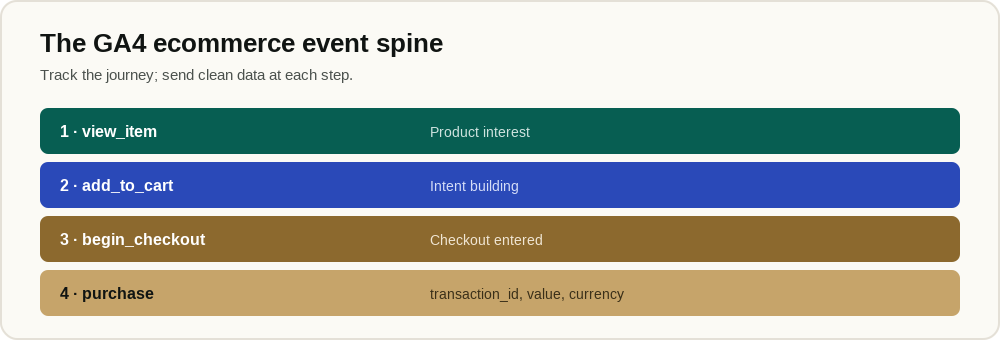
GA4 uses an event-based model. For ecommerce, Google defines a set of recommended events that cover the shopping journey. You do not need all of them on day one, but you do need the spine of the funnel.
The core ecommerce events are view_item, add_to_cart, begin_checkout, add_payment_info, and purchase. If you only ever implement two, make them view_item and purchase, because together they let you measure product interest and completed revenue. Adding the middle steps lets you see where people drop out of checkout, which is where most recoverable revenue hides.
Every event needs clean item data
Each ecommerce event should carry an items array describing the products involved: item id, item name, price, quantity, and ideally category and variant. The purchase event additionally needs a unique transaction_id and the order value and currency.
The two most common failures here are worth calling out. First, a missing or inconsistent transaction_id causes GA4 to either drop or double-count orders. It must be the real order number and it must be sent once per completed order. Second, sending value without currency, or with the wrong currency, quietly corrupts all your revenue reporting. These are not edge cases. They are the errors I see most often.
Mark real conversions as key events
In GA4, the actions you care about most are flagged as key events (the renamed version of what used to be called conversions). For an ecommerce store, purchase is the obvious one. You might also mark begin_checkout or a newsletter signup, depending on what you optimise towards.
Be disciplined here. If you mark ten things as key events, the word loses meaning and your reporting fills with noise. A purchase is a conversion. A page view is not. Keep the list short and tied to money or to a genuine step towards money.
Connect Google Ads and send it the purchase
If you run Google Ads, link it to GA4 and import the purchase key event, or better, send conversions server-side so they survive cookie and browser restrictions. This is the step that turns analytics into performance. Smart Bidding optimises towards the conversions you feed it, so if that signal is incomplete or delayed, bidding makes worse decisions on your behalf.
This is where GA4 setup and your paid media results connect directly. Accurate, complete, fast conversion data is not a reporting nicety. It is an input to the algorithm that spends your budget.
Verify before you trust
Before you rely on any of this, test it. Use GA4's DebugView to watch events fire in real time as you click through your own store. Place a test order and confirm the purchase event arrives once, with the right value, currency, transaction_id, and items. Check that refunds are handled if you need them.
A setup that has not been tested end to end is not done. It just has not failed visibly yet.
FAQ
Frequently asked questions
Almost always because of event data issues: duplicate purchase events inflating totals, missing transaction_id causing drops, wrong currency, or purchases that fire on a page people sometimes skip. Compare GA4 against your platform's order report and investigate the gap rather than assuming one is simply wrong.
No, but it makes life much easier. GTM lets you manage tags and read a data layer without editing site code for every change. You can install GA4 directly, but for ecommerce with multiple events, GTM is the practical choice for most teams.
They are the same thing. Google renamed conversions to key events in GA4 to reduce confusion with Google Ads conversions. When you mark an event as a key event, it shows up in conversion reporting and can be imported into Google Ads.
If you run meaningful paid media, yes. Server-side tracking recovers conversions that client-side tracking loses to cookie restrictions and browser defaults, which gives bidding a more complete signal. It is more setup, so weigh it against your spend, but for most serious stores it is worth it.
Reporting data typically appears within a day, but give it a few days of real traffic before drawing conclusions, and verify immediately with DebugView rather than waiting. If something is misconfigured, you want to catch it in testing, not discover it a week later in a report.
Similar posts
Measurement
Attribution Models in 2026: What Still Works
Attribution is less precise than dashboards suggest. What the common models still tell you, where they now mislead, and how to layer platform data, blended metrics and lift tests.
5 min read
Measurement
Server-Side Tracking and the Cookieless Future
Server-side tracking collects data via your own server, improving accuracy as cookies and client-side tracking erode. What it solves, what it does not, and consent first.
4 min read
Measurement
Ecommerce Marketing Attribution: How to Understand Which Channels Drive Growth
Learn how to interpret ecommerce attribution across Google Ads, Meta Ads and GA4 without confusing attributed revenue with incremental growth.
10 min read
Related services